




An email blast is the easiest thing in email marketing to do badly. You write one message, you push it to everyone on your list, and the mechanics take about ten minutes. What happens over the following week is where people get hurt.
I send from my own list constantly. Across the trailing 90 days I sent through Kit at my usual cadence, producing a 43.57% open rate, a 3.09% click rate, a 0.41% unsubscribe rate, and a 0.87% bounce rate, with open and click tracking both on. I will come back to why that open rate is not the number it looks like.
I also run email programs for clients as a Fractional CMO. Email is one of the three threads I built Digital Threads around, alongside search and social. So most of what follows is what I have learned running a list, not what a software company would like you to believe about its product.
The short version: a blast works when the list wants what you are sending. When it does not, the same send costs you subscribers and sender reputation at once. Sorting out which situation you are in is most of the job.
Key Takeaways
✅ An email blast is one message sent to a large group of subscribers at once, with no automation behind it. Vendors call the same thing a broadcast, a mass email, a bulk email, or an e-blast.
✅ Google, Yahoo, and Microsoft all enforce bulk sender rules, and all three ask for the same things: authenticate your sending domain, offer one-click unsubscribe, and keep spam complaints low.
✅ Sending from Outlook, Gmail, or a BCC field is the most common way a first blast fails. It fails on sending limits and authentication before anyone reads a word of your copy.
✅ Your open rate is mostly a machine reading. Apple’s Mail Privacy Protection loads tracking pixels whether or not a human sees the message, so judge a blast on clicks and replies instead.
✅ The cheapest protection against a bad blast is removing people before you send, not writing better copy after the complaints arrive.
What Is an Email Blast?
An email blast is a single message sent to a large portion of a subscriber list at one time, with no automation behind it. Kit, the platform I send from, calls it a Broadcast and defines it as a one-time email you send to a group of subscribers at a specific time.

You write it and you send it. Nothing fires it for you. Every other name you have heard for this means the same thing. Mass email, bulk email, e-blast, broadcast: same message, same moment, large audience. The word changes depending on whether a vendor is selling you deliverability infrastructure or making the practice sound modern. The mechanic underneath does not move.
What the word does not cover is anything triggered by behavior. A welcome email fires when someone subscribes. An abandoned cart email fires when someone leaves a checkout. Transactional emails fire on a receipt or a password reset. None of those are blasts, and mixing them up is how people end up sending the wrong thing.
The distinction that matters most is blast versus sequence.
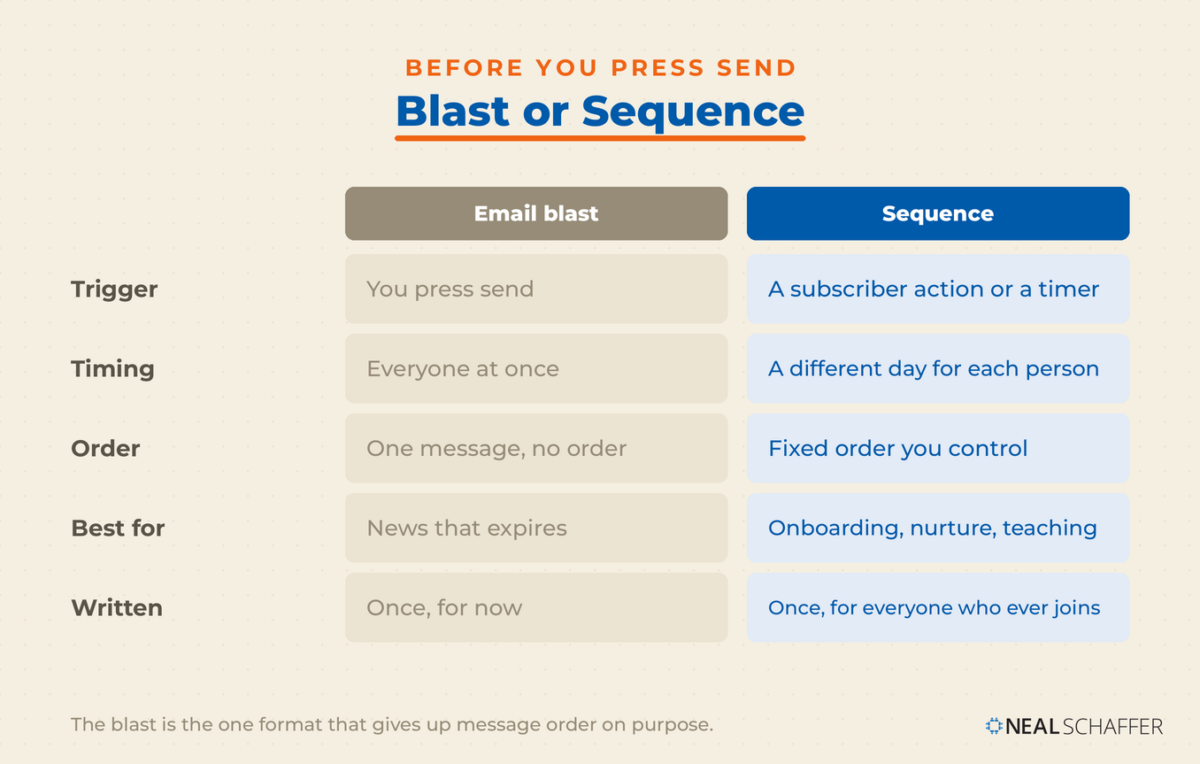
| Email blast (broadcast) | Sequence (drip) | |
|---|---|---|
| Trigger | You press send | A subscriber action or a timer |
| Timing | Everyone at once | A different day for each person |
| Message order | One message, no order | Fixed order you control |
| Best for | News that expires | Onboarding, nurture, teaching |
| Written | Once, for now | Once, for everyone who ever joins |
Bobby Klinck, author of *Email Marketing That Doesn’t Suck*, told me on my podcast that email “is the only channel where you can really curate the messages when it comes time to sell, the messages you want people to receive in the particular order you want them to receive.”
That control is the channel’s real advantage. A blast is the one format that gives it up on purpose, which is fine as long as you meant to.
Should You Send an Email Blast at All?
A blast is the right tool when the message expires and everyone needs it at the same time. A price change, a webinar tomorrow, a product that ships Friday, a security notice. If the value drops the longer someone waits, send it to everyone now.
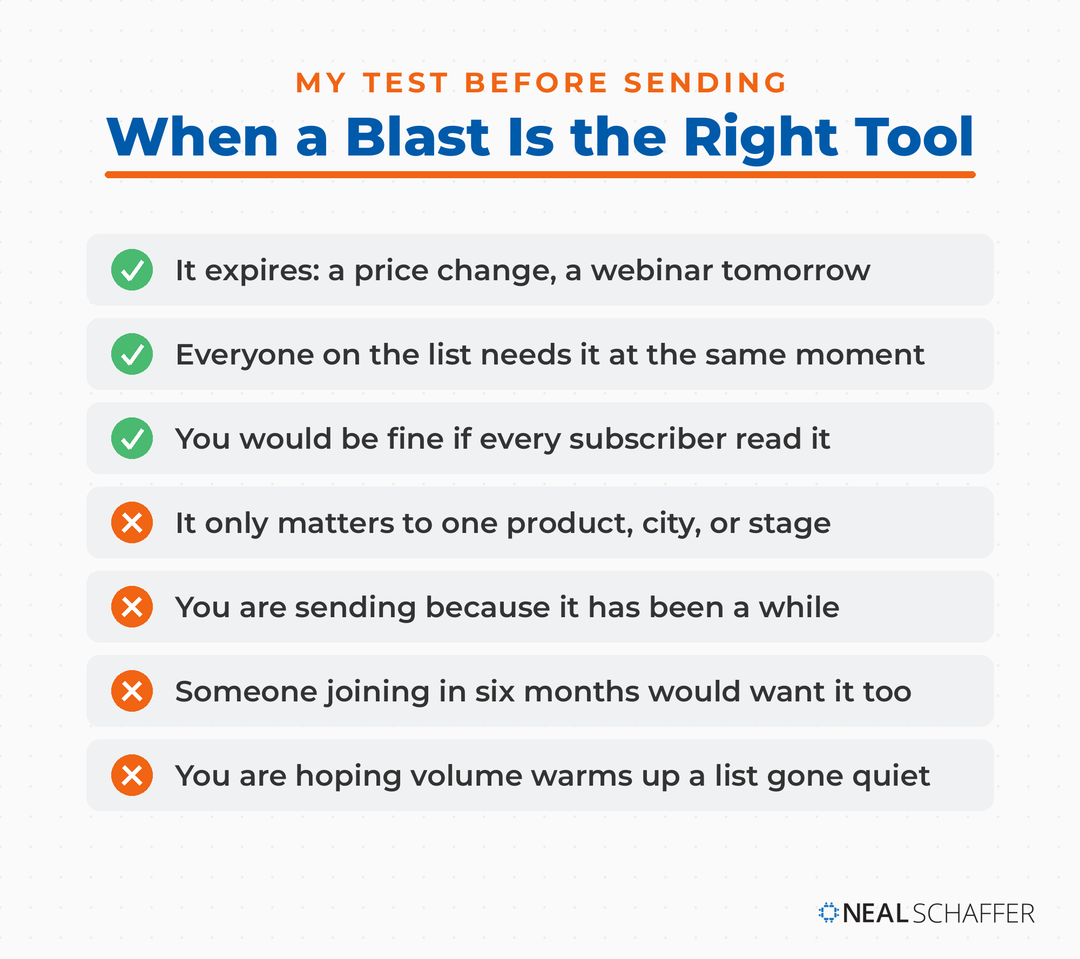
If the value does not drop, a drip campaign will almost certainly do better. It reaches each person at the moment the message is relevant to them, rather than at the moment that was convenient for you.
The test I use before pressing send is simple. Would I be comfortable if every single person on the list read this? Not “would they tolerate it.” Would it be worth their attention. If the answer is no for a meaningful chunk of the list, that chunk should not receive it.
A blast is probably the wrong tool if:
- The message only matters to buyers of one product, or people in one city, or people at one stage
- You are sending it because it has been a while, not because something happened
- The content teaches something a new subscriber six months from now would also want
- You are hoping volume makes up for a list that has stopped engaging
That last one is the expensive mistake. Sending more to a cold list does not warm it up. It converts quiet disengagement into spam complaints, and spam complaints are the one metric mailbox providers act on directly.
Who this is not for: anyone who bought or scraped a list. Yahoo tells senders plainly not to purchase mailing lists, and not to subscribe people through a pre-checked opt-in box. No amount of technique fixes a list that never agreed to hear from you, and building the list properly is the only version of this that works.
Assuming you have a real list and a message worth its attention, the next question is mechanical.
How Do You Send an Email Blast?
You send an email blast through an email service provider, not through your own inbox. The ESP handles authentication, unsubscribe headers, list management, and sending reputation, all of which become requirements rather than features once your volume climbs. The process runs five steps.
Order matters, because two of those steps, cleaning the list and sending a small slice first, cannot be undone once the send goes out.
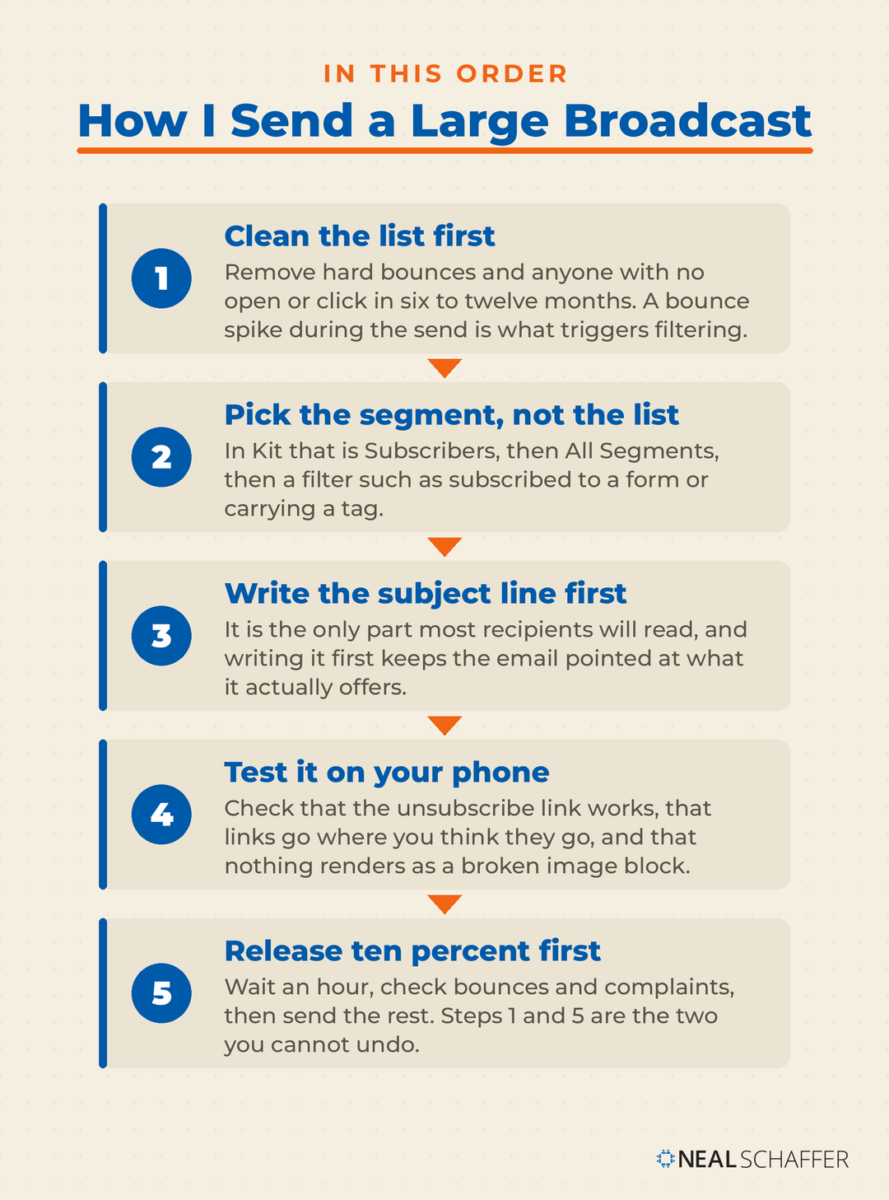
- Clean the list first. Remove hard bounces and addresses that have not opened or clicked in six to twelve months. Do this before the send. A bounce spike during a send is what triggers filtering, and by then you cannot take it back.
- Pick the segment, not the list. In Kit that means Subscribers, then the All Segments panel, then a filter such as “subscribed to Form X” or “has Tag Y.” Most platforms have an equivalent. Sending to everyone should be a deliberate choice.
- Write the subject line before the body. It is the only part most recipients will ever read, and writing it first keeps the email pointed at what it actually offers. Test two against each other if your platform supports it. For formats worth testing, start with email subject lines.
- Send a test to yourself and read it on your phone. Check that the unsubscribe link works, that links go where you think they go, and that nothing renders as a broken image block.
- Send to a slice first if the list is large or the send is unusual. Ten percent, wait an hour, check bounces and complaints, then release the rest.
What about sending from Outlook, Gmail, or BCC?
People try this constantly. It fails for reasons that have nothing to do with the message. Personal inboxes have low daily send caps, no unsubscribe handling, no list hygiene, and no way to authenticate at volume. A large BCC send also looks structurally like spam to a receiving server, because that shape is what bulk spam has always used.
One Strategy to Connect All Your Marketing
My latest book helps small businesses, entrepreneurs, and marketers bring search, email, and social together into one digital marketing strategy that actually compounds.
Drawing on my work as a Fractional CMO, Digital Threads turns complicated tactics into a clear, practical plan you can follow, whatever your budget or team size.
Grab your copy on Amazon and start weaving your own digital threads. Click the cover or the button below to get started.

Word’s mail merge is the closest legitimate version. Microsoft’s own instructions run Mailings, then Start Mail Merge, then E-mail Messages, pulling names from an Excel sheet. Word then sends an individual message per address, and Microsoft is explicit that you cannot CC or BCC anyone on a merge and cannot attach files, only link to them.
That is better than a BCC blast, because each recipient’s address is the only address on the To line. It still gives you no unsubscribe mechanism and no reputation monitoring, so treat it as a tool for fifty people at your company, not five thousand strangers.
Once you are sending at volume through a proper platform, the mailbox providers have opinions about how you do it.
What Do Gmail, Yahoo, and Outlook Require From Bulk Senders?
Send more than 5,000 messages a day to Gmail accounts and Google requires SPF, DKIM, and DMARC authentication. It also wants a one-click unsubscribe header, a visible unsubscribe link, and spam rates that stay below 0.10% and never reach 0.30%. Miss those and your mail gets filtered or rejected.
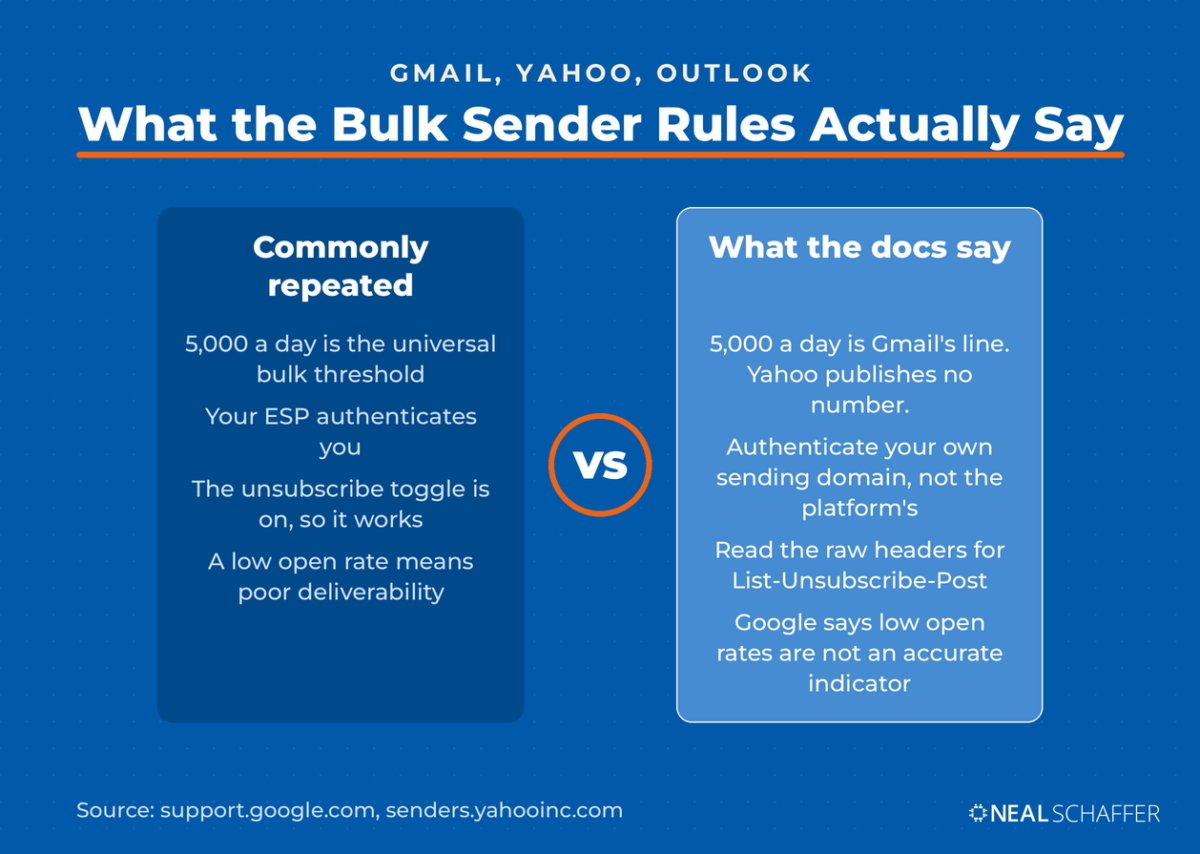
Those three acronyms confuse people, so plainly. SPF lists which servers may send mail for your domain. DKIM signs each message so the recipient can verify it was not altered. DMARC tells receiving servers what to do when the first two fail. Your ESP sets all three up for you. The step people skip is authenticating their own sending domain rather than sending from the platform’s shared one.
One-click unsubscribe is not a marketing phrase either. It is an IETF standard, Signaling One-Click Functionality for List Email Headers, published in 2017, which is why your ESP talks about a List-Unsubscribe-Post header. Turn it on in your platform’s settings, then verify it rather than trusting the toggle.
How do you confirm one-click unsubscribe is actually working?
Do not verify it by looking for the Unsubscribe link at the top of the message. Yahoo says in the same FAQ that the link appears only when the header is set up correctly and the provider already sees enough reputation and engagement for your sending address. A correctly configured send can show no link at all. Read the headers instead:
- Open one of your own sends in Gmail on desktop
- Click the three-dot menu at the top right of the message
- Choose Show original, which opens the raw message in a new tab
- Search that page for List-Unsubscribe-Post, and keep going past the first hit. The string also appears inside the DKIM signature’s h= list, which only records that the header was signed. You want the line that begins with it, reading List-Unsubscribe-Post: List-Unsubscribe=One-Click
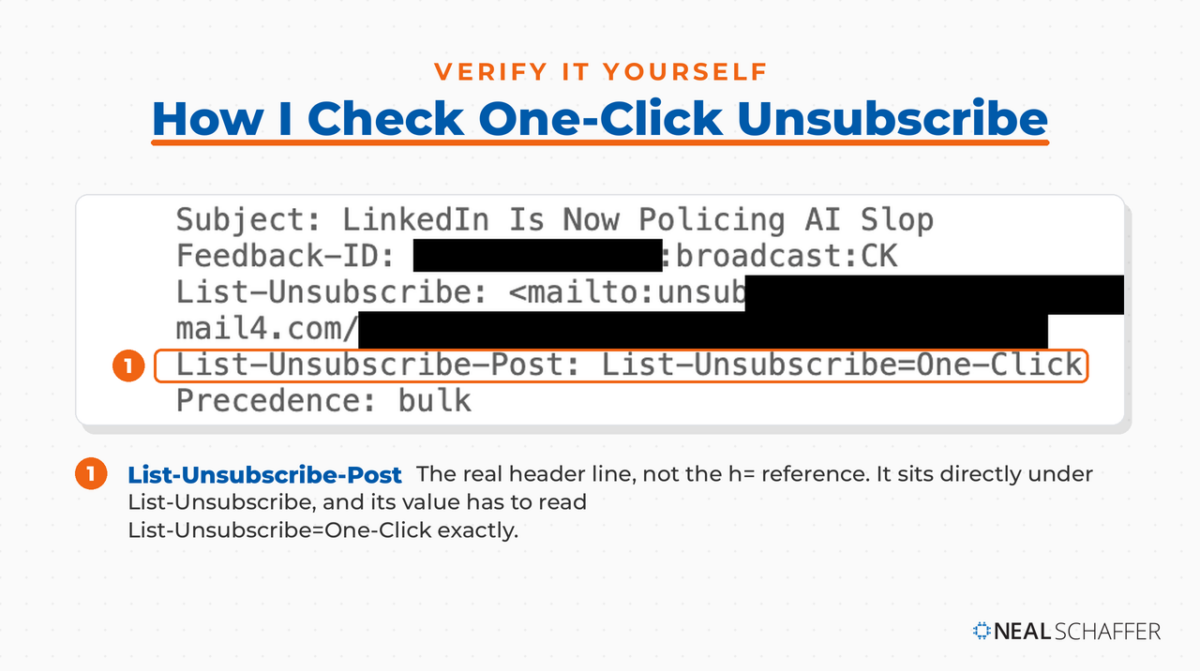
The List-Unsubscribe line just above it may carry two addresses, a mailto and an https URL. That is correct, and the standard allows both. If the Post line is missing, one-click unsubscribe is not running, whatever your dashboard says.
Microsoft extended the same expectations to consumer Outlook, publishing its own requirements for high volume senders in 2025. One thing to watch there: Microsoft revised what happens to non-compliant mail after the original announcement, so read the current page rather than a summary quoting the first version of it.
Yahoo is worth reading carefully, because it deliberately declines to publish a volume number. Its own FAQ says a bulk sender is one sending significant volume, and that Yahoo will not specify a volume threshold. So the 5,000 figure everyone quotes is Google’s line, not a universal one. You can be treated as a bulk sender at Yahoo well under it.
The compliance floor, separate from the technical one:
- The US CAN-SPAM Act requires accurate headers, a subject line that reflects the content, a valid physical postal address, and honoring an opt-out within 10 business days, with penalties reaching $53,088 per message
- Under GDPR, consent has to be as easy to withdraw as it was to give, and pre-ticked boxes and silence do not count as consent at all
- CAN-SPAM makes no exception for business-to-business email, which surprises people every time
Meeting the floor keeps you legal. Staying out of the spam folder takes more than that.
How Do You Keep an Email Blast Out of the Spam Folder?
Spam placement traces back to three things, in this order: authentication, list hygiene, and volume behavior. Copy matters far less than any of them. My own bounce rate sits at 0.87% and my unsubscribe rate at 0.41%, and both stay there because of the removals I make before a send, not because of anything I write.
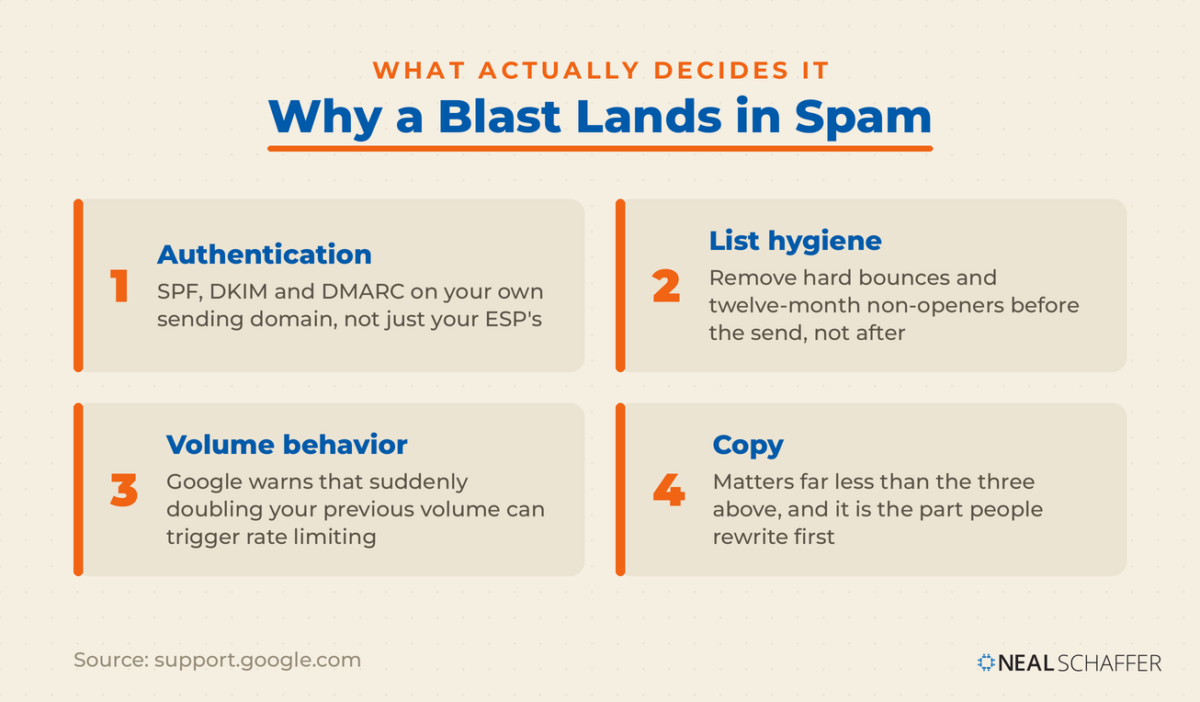
List hygiene is the part people avoid, because it feels like going backwards. You spent months building the list and now you are deleting from it. Do it anyway. Subscribers who stopped engaging a year ago are not dormant customers. They are the people most likely to hit the spam button.
The Google sender guidelines cited earlier make two further points worth acting on. Low open rates are not on their own an accurate indicator of deliverability, so check your real spam rate in Postmaster Tools rather than reading tea leaves in your ESP dashboard. And avoid sudden volume spikes. Google’s own example is that doubling your previous volume overnight can trigger rate limiting or a reputation drop.
Yahoo makes a related point that gets ignored more often. It asks senders to honor the frequency their list agreed to, rather than start sending daily to people who subscribed to a monthly.
Yahoo’s frequency point is exactly where blasts go wrong. A quarterly newsletter list that suddenly gets four promotional blasts in a week has not been sent bad copy. It has been sent a different product than it signed up for.
Before your next large send, do these four things:
- Confirm SPF, DKIM, and DMARC pass for your sending domain, not just your ESP’s domain
- Suppress anyone with a hard bounce, and anyone with zero opens or clicks in twelve months
- Send the first slice to your most engaged segment, so the earliest signals reaching the provider are positive
- If this send is more than double your normal volume, split it across two or three days
For the full technical path, including the DNS records themselves, my page on email deliverability goes deeper than this section can. Email list management handles the removal side on a schedule.
With the plumbing sound, the message itself starts to matter again.
What Should the Email Itself Look Like?
A blast should carry one subject line that describes the content, one clear call to action, a visible unsubscribe link, and a sender name that identifies you. Google’s sender guidelines go further here than most marketers realize. They name display names to avoid outright, including “Last Chance,” “URGENT REQUEST,” and “TIME IS RUNNING OUT (SALE).”
That point deserves a moment, because it sits in documentation nobody reads. The display name field is for identifying the sender. Putting a promotion in it is treated as deceptive, alongside emoji used to imitate verification badges and display names that imply a threaded reply. If your blasts use any of these, the fix takes thirty seconds.
The rest of the format, briefly:
- One call to action. Not one style of call to action repeated four times. One thing you want the reader to do. Competing asks split the click and neither wins.
- A subject line that survives truncation. Phones cut subject lines short, so put the meaningful words first and let the rest fall off.
- A body that reads without images. Many clients block or delay images. If your entire offer sits inside a graphic, a share of your list sees an empty rectangle.
- An unsubscribe link people can find. Hiding it does not keep subscribers. It converts unsubscribes into spam complaints, which cost you far more.
I would argue the display name and the unsubscribe placement matter more than most of the copy decisions people agonize over, simply because both affect whether the message is delivered at all.
Then the numbers come back, and reading them correctly is harder than it looks.
How Do You Know If Your Email Blast Worked?
Judge a blast on clicks, replies, and whatever conversion you were after. Do not judge it on the open rate. Apple accounted for 62.26% of all tracked email opens in July 2026, across more than a billion opens measured by Litmus. Apple’s Mail Privacy Protection loads tracking pixels on its own.
Apple states it plainly. Mail Privacy Protection hides the recipient’s IP address and prevents senders from seeing whether the message was opened. Those opens still register in your dashboard. They are just not evidence of anything.
So my 43.57% open rate is not a claim that four in ten subscribers read my email. It is a number inflated by a majority-Apple audience whose devices open my messages automatically. The 3.09% click rate is the one I watch, because a click required a person.
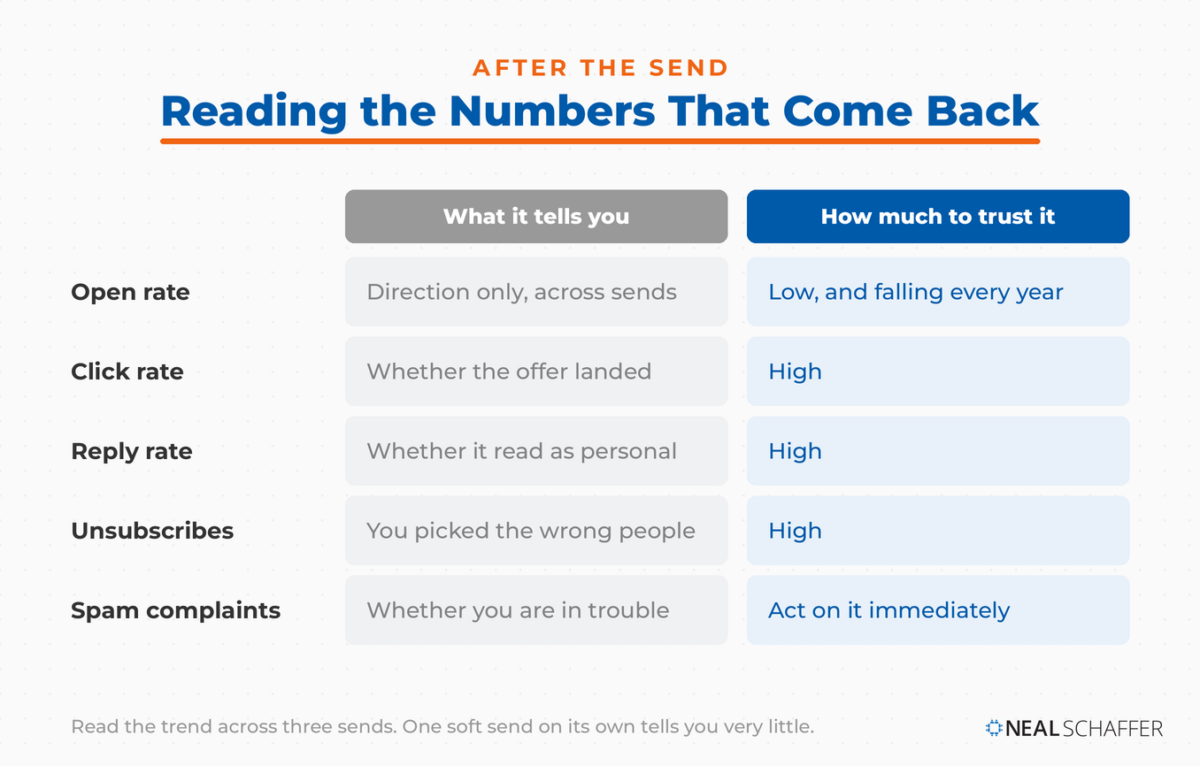
| Metric | What it tells you | How much to trust it |
|---|---|---|
| Open rate | Direction only, across many sends | Low, and falling every year |
| Click rate | Whether the offer landed | High |
| Reply rate | Whether the message felt personal | High |
| Unsubscribe rate | Whether you sent to the wrong people | High |
| Spam complaint rate | Whether you are in trouble | Highest, act on it immediately |
Read the trend across sends rather than any one campaign. From what I have seen running my own list, a single soft send tells you very little, while three in a row moving the same direction tells you something worth acting on.
If the drift is downward, the fix is usually frequency or segmentation before it is copy. Improving your email open rate is mostly a list problem wearing a subject-line costume. For the wider picture of what these numbers look like across the industry, the email marketing statistics I maintain get updated as new benchmark data lands.
Which Email Blast Software Should You Use?
The right email blast software is whichever one authenticates your domain, handles unsubscribes automatically, and lets you segment before you send. Those three capabilities are the whole requirement. Past them you are choosing an interface, and the differences are smaller than the comparison charts suggest.
I use Kit, and have for years. Before that I ran email on Brevo, ActiveCampaign, Constant Contact, Mailchimp, MailerLite, and Keap, the platform that spent its first seventeen years as Infusionsoft. I have tested AWeber too, without ever running a list on it. Most of them will do everything described in this post. Mailgun and SendGrid sit in a different category, built for developers sending through an API rather than marketers writing in an editor.
Start on a free tier. Compare them side by side and Kit’s is the most generous I have found: the free Newsletter plan carries up to 10,000 subscribers, while both paid tiers start at 1,000. That gap is why I tell every Fractional CMO client to start there. A free plan also tells you within two sends whether the editor annoys you, which is the thing you cannot learn from a feature list. Upgrade when list size or automation forces the issue, and email marketing cost shows where the pricing tiers actually bite.
What I would not do is pick a platform on deliverability claims. Every vendor advertises a high delivery rate, and none of them can promise inbox placement, because that depends on your domain, your list, and your sending behavior rather than theirs.
Frequently Asked Questions
An email blast is one message sent to a large portion of your subscriber list at the same time, with no automation behind it. It is usually a newsletter, a company announcement, or a promotional offer. Mass email, bulk email, broadcast, and e-blast all describe the same thing.
They work when the message is time-sensitive and the segment receiving it actually wants it. They fail when they go to a full list out of habit. The format is not the problem. Sending irrelevant messages to people who did not ask for them is, and email marketing best practices gets into the habits that separate the two.
Yes, provided you follow the rules for your recipients’ jurisdiction. In the US that means accurate headers, a truthful subject line, a physical postal address, and honoring opt-outs within the CAN-SPAM window noted earlier. In the EU and UK it means valid consent that can be withdrawn as easily as it was given. Buying a list satisfies neither.
Send at the frequency your subscribers agreed to when they signed up, and change it slowly if you change it at all. Watch unsubscribe and spam complaint rates rather than guessing. If either climbs after a frequency change, you have your answer.
You can send to a handful of people, but not at scale. Personal inboxes cap daily sends, offer no unsubscribe handling, and cannot authenticate properly for bulk volume. Word’s mail merge is a workable middle path for small internal sends. Anything larger belongs in an email service provider.
Send Your Next Blast on Purpose
Before your next send, do three things in this order. Clean the list, so the people most likely to complain never receive it. Pick a segment rather than defaulting to everyone. Then check that your domain authenticates, since none of the rest matters if the message never arrives.
After the send, ignore the open rate and look at clicks, replies, and unsubscribes. Those three tell you whether the message was worth sending, which is the only question that carries into the next one.
If blasts are one piece of a larger program you are building, email marketing strategy lays out where broadcasts fit alongside sequences and automation. You can also grab my Definitive Guide to Email Marketing as a free ebook if you would rather have the whole thing in one place.
And if you are a business trying to make email pull real revenue rather than fill a calendar slot, that is a large part of what I do as a Fractional CMO.
Actionable advice for your digital / content / influencer / social media marketing.
Join 13,000+ smart professionals who subscribe to my regular updates.