




A lot of clients and marketers I talk to come to me with the same first question about CRM and email: which CRM tool should I buy. It is the wrong first question, even though it feels like the practical one to ask.
The right first question is whether you actually need an integrated CRM email marketing platform, or whether your current setup is failing for reasons no tool will solve. After advising businesses as a Fractional CMO across various B2C and B2B industries for more than a decade, I can tell you the answer depends on four things: whether you sell B2B (lead-driven, longer sales cycles) or B2C (transactional, brand-led at scale), the quality of your customer data, the maturity of your sales motion, and the size of the team you have to keep both systems clean.
What follows is the decision framework I walk clients through before any tool selection conversation, and then tool picks bucketed by use case so the right platform for a 3-person ecommerce brand is not lumped in with the right platform for a 200-person B2B SaaS company. I wrote about why email is the most valuable channel I work with in Digital Threads, and the central reason is that the email list is the only customer database you actually own. That data is also CRM data. Treating them as one asset, not two, is the shift most small and mid-market businesses are missing.
Key Takeaways
✅ CRM email marketing is the practice, not a product category. It is what happens when CRM data (purchases, behaviors, lifecycle stage) drives the segmentation, timing, and personalization of email. The tool decision comes second.
✅ Combining your CRM and email platform pays off only when your data is clean. Personalization built on bad data accelerates the wrong message to the wrong person. McKinsey research shows companies that excel at personalization generate 40 percent more revenue from those activities than average players, but that lift only shows up when the data feeding it is accurate.
✅ The ROI case for email is already settled. Litmus puts email ROI at $36 for every $1 spent, higher than any other channel. The question is whether your CRM strategy is letting you capture that return or leaking it.
✅ There is no single best CRM with email marketing. There are seven distinct buyer profiles, from solo service businesses to enterprise B2B, and the right answer changes for each one.
✅ Most clients I work with already own the tools they need. Before buying anything new, audit whether your existing CRM has email or your existing ESP has CRM functionality. Tool sprawl is the silent killer of marketing ROI.
What Is CRM Email Marketing?
CRM email marketing is the practice of using customer relationship management data to drive segmentation, automation, and personalization in email campaigns. It is not a product you buy, it is an integration pattern you implement. The CRM holds the customer record (deals, lifecycle stage, support history). The email platform sends the message. When the two are actually used together as one system, the message becomes relevant.
Salesforce defines it slightly differently. They call CRM email marketing email marketing that uses CRM tools for more personalized, more effective direct marketing contact. That framing is fine for a vendor whose business depends on selling you both systems, but it misses the strategic point: most businesses already have CRM data sitting somewhere. The gap is not access to the data, it is whether that data is actually piped into the email sending decision.
In practical terms, CRM email marketing means a few things working at once. Your CRM is the single source of truth for who a contact is. Your email platform sends based on segments defined by CRM data (not just a flat list). Behaviors in the email (opens, clicks, replies) flow back to the CRM record so sales and marketing see the same picture. The goal is one customer view across the buying journey.
Why CRM Email Marketing Matters Now
CRM email marketing matters because the gap between personalized and generic email is widening, and businesses on the wrong side are losing share. McKinsey research shows 71 percent of consumers expect personalized interactions and 76 percent get frustrated when this does not happen. Generic email is now actively damaging the relationship.
I write extensively about email in Digital Threads, and the line I keep coming back to is that email is the most under-appreciated channel in marketing. It delivers the highest ROI of any channel and it is the only audience asset you fully own. Search algorithms shift. Social platforms change ownership and rules overnight. Your email list and the CRM data attached to it are yours.
This is why small businesses keep using it. Oberlo’s research shows roughly 81 percent of small and medium-sized businesses still rely on email as their main sales engine. The reason is not nostalgia. It is that email reaches customers directly, and the CRM data attached to those email contacts is what makes the channel scalable. Nutshell’s CRM research finds that CRMs boost sales by 24 percent, lift productivity 34 percent, and improve sales forecast accuracy by 42 percent. Those gains compound when the CRM is actively feeding the email program, not just connected to it on paper.
The economics back this up. The most current benchmark I trust is Litmus’s State of Email report, which puts email at $36 ROI for every $1 spent. For context, no other digital channel comes close, and HubSpot’s research finds 93 percent of marketers say personalization improves leads or purchases (which only happens when CRM data is doing the personalizing). The question I ask clients is not whether to invest in email. It is whether they are getting the full ROI possible or only a fraction because the CRM data is not actively driving the email program, even when the systems are technically connected.
For deeper benchmarks on what is driving email performance right now, I keep current numbers in my email marketing statistics collection, which tracks the data points I cite when I advise clients.
The Decision Framework: Should You Combine Your CRM and Email Platform?
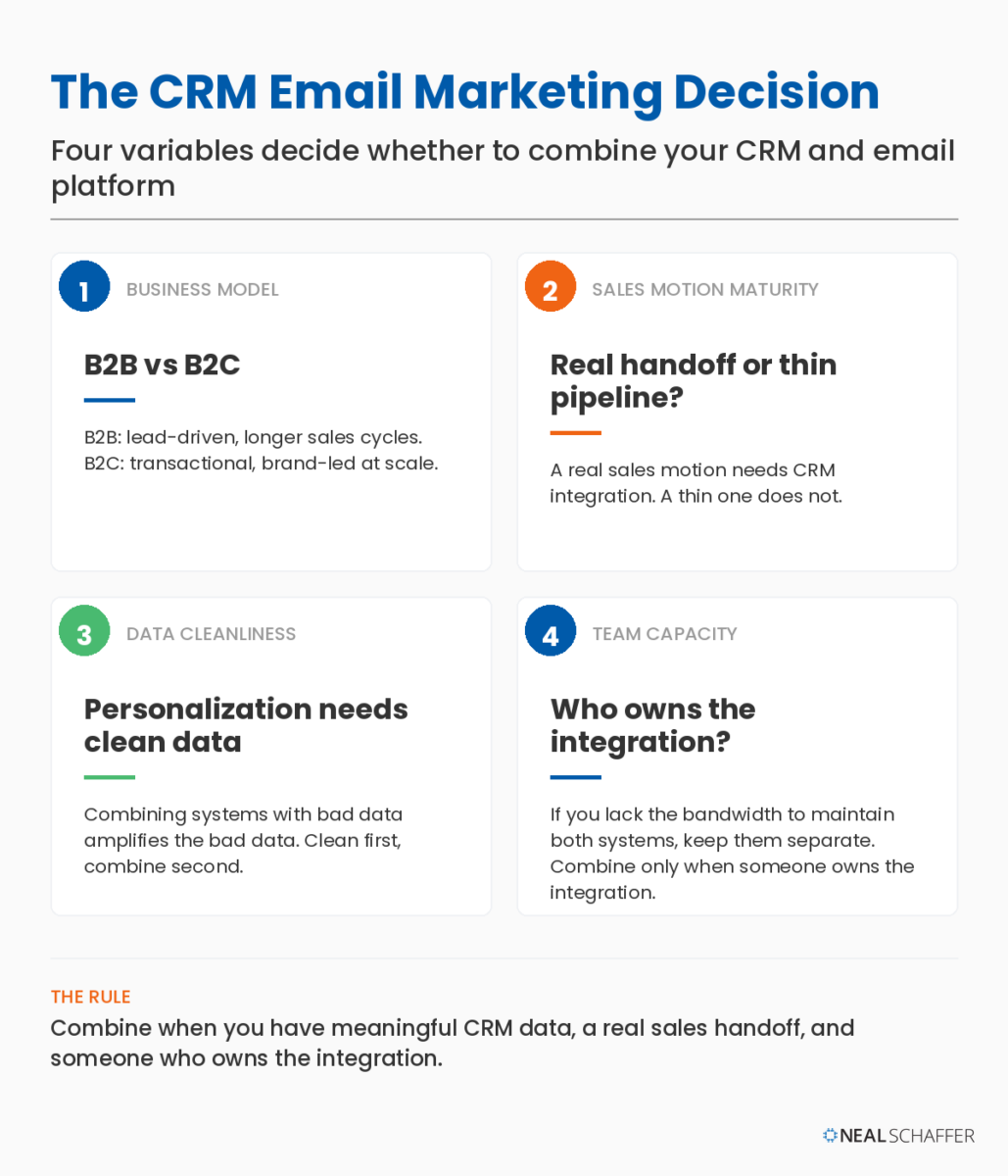
The right answer depends on four variables: B2B vs B2C, sales motion maturity, data cleanliness, and team capacity. Combine them when you have meaningful CRM data, a real sales handoff, and someone who owns the integration. Keep them separate when your data is messy, your sales motion is thin, or you lack the bandwidth to maintain both.
Here is the decision table I walk clients through before any tool selection conversation:
| Your situation | Combine CRM + email? | Why |
|---|---|---|
| Solo consultant, no sales pipeline, list under 5,000 | No, use a simple ESP | A CRM adds overhead with no return at this scale |
| Ecommerce brand, behavioral data is everything | Yes, with an ecommerce-native tool | Purchase data should fire transactional email automatically |
| B2B SaaS with sales reps and a pipeline | Yes, with two-way sync | Email engagement should inform lead scoring and rep outreach |
| Service business (agency, plumber, consultant) | Yes, all-in-one with appointment features | The contact, the appointment, and the follow-up should be in one place |
| Multi-product enterprise with complex deals | Yes, with marketing automation layer | Salesforce + Pardot territory, not for the faint of heart |
| Small team, messy data, no clear owner | No, clean data first | Combining systems with bad data amplifies the bad data |
| Membership or community business | Yes, with behavior-based automation | Engagement signals are the entire retention strategy |
The pattern I see across my Fractional CMO engagements: businesses skip directly to tool selection without doing the data audit first. They buy HubSpot, migrate three contact lists into it, and six months later the dashboards are reporting on garbage. The tool did exactly what it was supposed to do. The strategy was the problem.
The Three Client Patterns I See Most Often
Three patterns repeat across the engagements I see. Each one has a different root cause, and each one has its own failure mode. Recognizing which pattern you are in saves months of trial and error and significant tool spend.
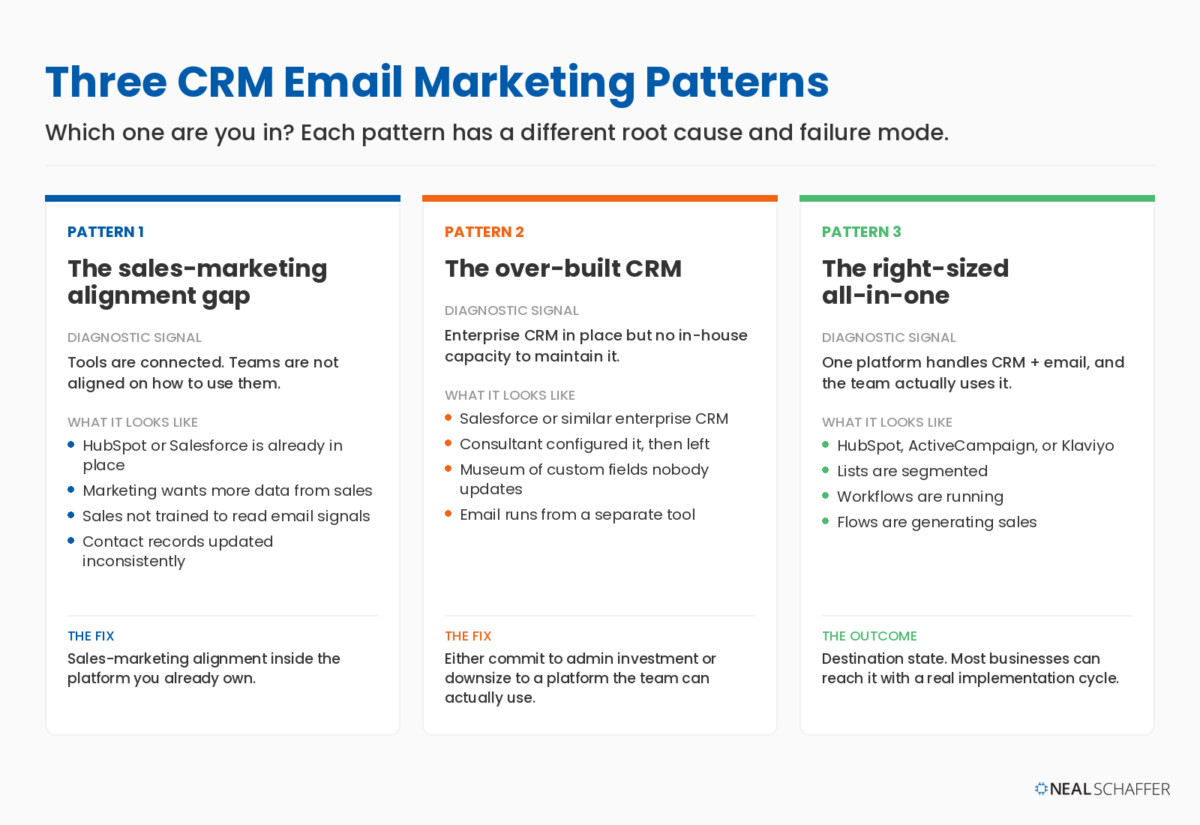
Pattern 1: The sales-marketing alignment gap. This is by far the most common, especially with B2B clients. The client has HubSpot or Salesforce in place with the CRM and built-in email marketing platform already connected, but sales and marketing are not aligned on how to use the integration. Marketing wants sales to input more data so the email program can segment and personalize properly. Sales has never been trained to read the email engagement signals the CRM is already capturing on their accounts. The contact records sales does maintain get updated inconsistently, which leaves the email program firing on increasingly dirty data. A new tool rarely fixes this. The fix is sales-marketing alignment inside the platform you already own.
Pattern 2: The over-built CRM. The client invested in Salesforce or a similar enterprise CRM at some point, paid a consultant to configure it, and never built the in-house capacity to maintain it after the consultant moved on. The CRM becomes a museum of custom fields nobody updates. Email is sent from a separate tool because the marketing person could not figure out Marketing Cloud, or because nobody wanted to deal with the configuration overhead. The fix here is usually painful: either commit to investing in the platform you already own (admin time, training, cleanup) or downsize to something the team can actually use.
Pattern 3: The right-sized all-in-one. The client picked one platform (HubSpot, ActiveCampaign, Klaviyo) that handles both CRM and email, and they actually use it. Lists are segmented, workflows are running, sales sees email engagement, and flows are generating sales. This is the destination state. Most businesses can move from either of the first two patterns to this one if they commit to a real implementation cycle.
7 CRM Email Marketing Platforms by Use Case
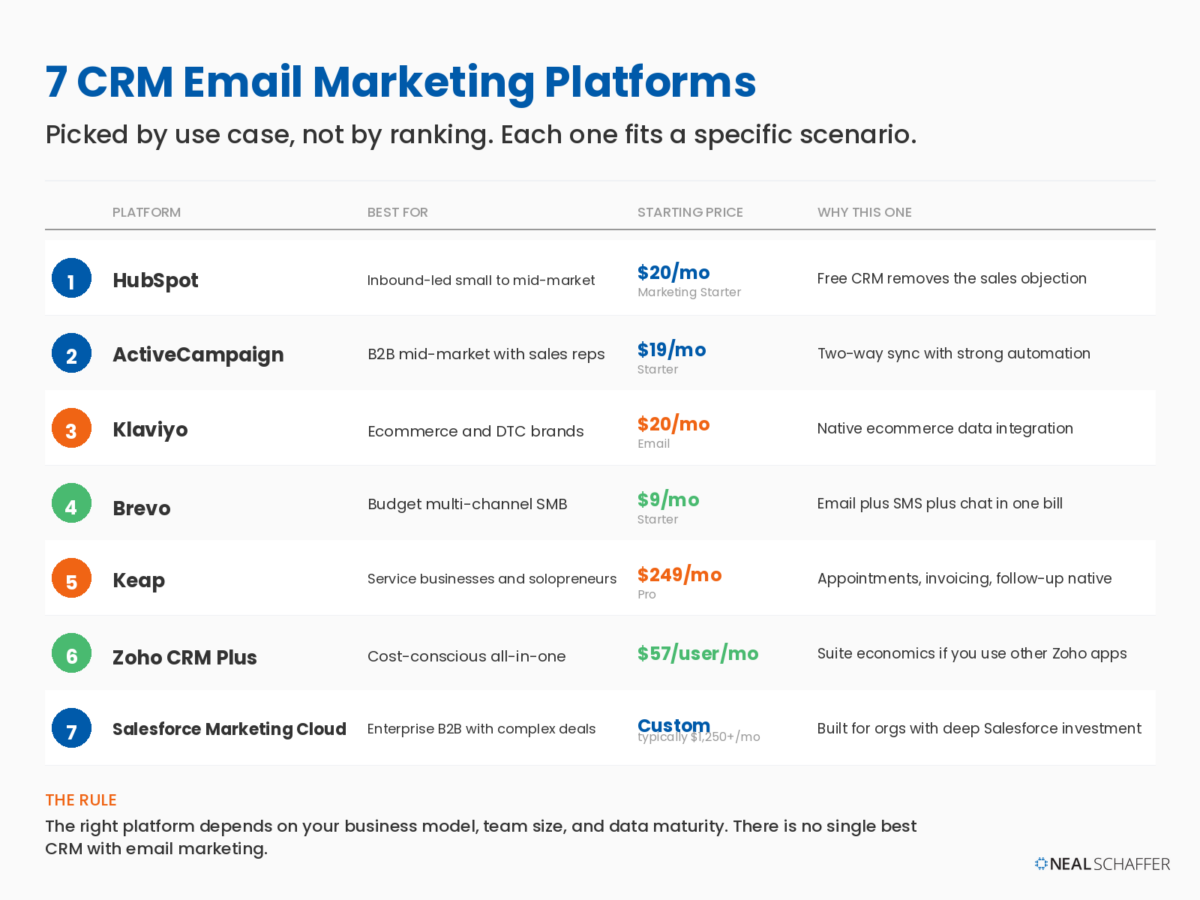
The right CRM email marketing platform depends on your business model, team size, and data maturity, not on a ranking. Below are seven picks, each tied to a specific scenario where it tends to be the right answer. These reflect the platforms I most often consider when advising clients, not a feature-by-feature comparison of every tool on the market.
| Platform | Best for | Starting price (paid) | Why this one |
|---|---|---|---|
| HubSpot | Inbound-led small to mid-market | $20/mo (Marketing Starter) | Free CRM removes the sales objection |
| ActiveCampaign | B2B mid-market with sales reps | $19/mo (Starter) | Two-way sync with strong automation |
| Klaviyo | Ecommerce and DTC brands | $20/mo (Email) | Native ecommerce data integration |
| Brevo | Budget multi-channel SMB | $9/mo (Starter) | Email plus SMS plus chat in one bill |
| Keap | Service businesses and solopreneurs | $249/mo (Pro) | Appointments, invoicing, follow-up native |
| Zoho CRM Plus | Cost-conscious all-in-one | $57/user/mo | Suite economics if you use other Zoho apps |
| Salesforce Marketing Cloud / Account Engagement | Enterprise B2B with complex deals | Custom (typically $1,250+/mo) | Built for orgs with deep Salesforce investment |
Prices reflect publicly listed entry-level plans at time of writing and change frequently. Below, the use case logic for each.
The Digital Marketing Playbook for Small Teams
My latest book helps small businesses, entrepreneurs, and marketers bring search, email, and social together into one digital marketing strategy that actually compounds.
Drawing on my work as a Fractional CMO, Digital Threads turns complicated tactics into a clear, practical plan you can follow, whatever your budget or team size.
Grab your copy on Amazon and start weaving your own digital threads. Click the cover or the button below to get started.

1. HubSpot: The Default for Inbound-Led Businesses
HubSpot is a strong default when a business has no CRM yet and is doing any meaningful inbound marketing. The free CRM is genuinely usable, the Marketing Hub adds email and automation on top, and the data model is the same across both, which is the part that matters.
The catch with HubSpot is pricing. Once your marketing contact count grows past the Starter tier limits, the bill scales quickly. The pattern I recommend: start on the free CRM, prove the workflow with Marketing Starter, and pressure-test whether you actually need Pro before committing to the higher tier. Many businesses can do everything they need on the lower plans. Or they can do the same at a lower price by migrating to ActiveCampaign, a choice I helped a Fractional CMO client make who was using only a fraction of the functionality that a high-price HubSpot plan was offering.
2. ActiveCampaign: The B2B Mid-Market Pick
ActiveCampaign tends to be the right fit when a business has a sales team and the CRM needs to do real pipeline work, but the budget will not stretch to Salesforce. The marketing automation builder is the strongest in this tier, the CRM is lighter than HubSpot’s but tighter for sales-led motion, and the two-way Salesforce sync is solid for businesses that eventually outgrow it.
The pattern where ActiveCampaign earns its place: email engagement flows into lead scoring, lead scoring routes contacts to reps, and reps see the email history when they reach out. That closed loop requires both an integrated platform and a sales-marketing team aligned on how to use it.
I have personally used ActiveCampaign for my own email marketing, and similar to HubSpot, I found it gets expensive when you reach a certain subscriber threshold. For me it was 10,000 contacts, and although pricing is always changing, keep in mind that the larger your list the more potential cost benefit moving to another platform might provide you.
That said, do not assume cost is the only variable. I have been impressed with ActiveCampaign’s AI features since seeing them demonstrated when I spoke at a recent DigiMarCon Hollywood, particularly predictive sending at the per-contact level, the AI campaign builder, and brand-aware content generation. Weigh feature parity against price before migrating.
3. Klaviyo: The Ecommerce Specialist
Klaviyo is the right pick for ecommerce, hands down. The native integrations with Shopify, WooCommerce, BigCommerce, and others pull purchase data, browsing behavior, and lifecycle stage directly into the segmentation engine. Abandoned cart, post-purchase, win-back, and replenishment flows are easier to build in Klaviyo than in most other platforms because the ecommerce data model is native, not bolted on. There was a point where I was recommending ActiveCampaign for ecommerce many years ago, but since then Klaviyo has firmly and deeply integrated its software with the major ecommerce CMSs and added innovative automation features to become the default it is today.
If you run an ecommerce brand, I write more about this in my ecommerce email marketing post. The short version: Klaviyo wins on data depth for retail, even though it costs more than Mailchimp at the same contact volume. The cart recovery flows alone usually pay for the price difference, and the remaining flows (like Browse Abandonment and Win-Back) are icing on the cake. There is also more on abandoned cart email flows that map cleanly to Klaviyo’s flow builder.
4. Brevo (formerly Sendinblue): The Budget Multi-Channel Option
Brevo earns its spot when the need is email plus SMS plus chat on a single bill and the budget cannot justify HubSpot pricing. The CRM functionality is lighter than the dedicated CRMs, but for small businesses that mostly need contact records and email automation, it covers the essentials.
Brevo is a useful recommendation for solopreneurs and very small teams who need transactional and marketing email from the same platform without doubling their software spend. The deliverability is generally good, and the free tier (up to 300 emails per day) is genuinely useful for businesses still building their list. I currently use the free tier of Brevo as the email server for the contact forms on this website.
5. Keap: The Service Business Specialist
Keap is purpose-built for service businesses. Appointments, quotes, invoicing, and follow-up all live alongside the CRM and email tool. For a plumber, electrician, consultant, agency, or coach, that integration matters more than fancy automation. The contact that books an appointment is the same contact that gets the appointment reminder, the same contact that gets the invoice, and the same contact that gets the post-job follow-up. Keap’s pricing is higher than entry-level alternatives, but the time savings on a service business with even a few employees usually justifies it.
If you run a service business and your appointment scheduler does not talk to your email tool, Keap (or something like it) is probably your fastest win. The all-in-one shape eliminates the appointment-to-follow-up handoff that often gets dropped in fragmented stacks.
I was a previous user of Keap’s original brand Infusionsoft. After attending Infusionsoft University (yes, it was a thing!), my impression was that it was better suited for service businesses and could handle small business automation outside of mere email marketing very well.
6. Zoho CRM Plus: The Cost-Conscious All-in-One
Zoho wins on economics when a business is already using one or more Zoho apps. The CRM Plus bundle includes CRM, email campaigns, social, projects, and analytics for less than HubSpot’s CRM-only Pro tier. The trade-off is interface polish and ecosystem depth. Zoho will let you do nearly everything HubSpot does, just with more clicks and a slightly steeper learning curve.
Zoho is the right call when budget is the binding constraint and the team has the patience to learn it. The economics are real, especially as you scale contacts.
7. Salesforce Marketing Cloud and Account Engagement: The Enterprise Pick
For enterprise B2B with complex deals, multiple business units, and existing Salesforce investment, Salesforce Marketing Cloud is usually the right answer (even though it is rarely the easiest). Marketing Cloud handles B2C-style high-volume campaigns. Account Engagement (formerly Pardot) handles B2B nurture and lead scoring. Both connect natively to Salesforce CRM, which is the whole point.
The reason this is the last pick rather than the first is operational. Salesforce only works if the team has the admin headcount to keep it working. When the team running Salesforce is too thin for the platform’s complexity, a simpler all-in-one is the better recommendation. If you have the team, Salesforce is best in class. If you do not, you will be in Pattern 2 (the over-built CRM) within a year.
What I Wrote in Digital Threads About the CRM-Email Connection
One of the points I keep coming back to in my Digital Threads book is why the email list and the CRM data attached to it should be treated as the same asset:
“Your email lists are yours. You own them, and all the invaluable CRM data that goes with it. When you’re creating content, you’re building assets. Building an email list means you are also building assets and continuing that conversation started by that content. You’re more in control of the conversation and the relationship and guiding the contact down the customer’s journey.” – Neal Schaffer
Search engines change algorithms. Social platforms change ownership. Ad platforms change pricing. The email list and its CRM data are the one digital asset whose value is not subject to a third party’s product decisions. That is why the right CRM email marketing setup is a foundational architecture decision before it is a tool decision. The platforms above are tools in service of the asset.
How to Actually Combine CRM and Email: A 5-Step Implementation Sequence
The order you sequence the integration matters as much as the tool you pick. The pattern that works on most engagements is the same regardless of platform. Skip a step and the personalization built on top of the foundation will be unstable. Get the order right and you will see compounding returns within a few months.
Here is the sequence:

Step 1: Clean the contact data first. Before any integration, dedupe your contacts, validate email addresses, and confirm that lifecycle stage (lead, MQL, SQL, customer, lapsed) as well as previous sales data (products, sales amount, etc.) is captured consistently. This is unglamorous and it is also the single most valuable thing you can do at this stage. Personalization built on duplicates and bad data is worse than no personalization.
Step 2: Define the segments you actually need. Not the segments your tool can technically support. The segments that change what you send. For most businesses, three to seven segments is the right number. New subscribers, active customers, lapsed customers, high-value buyers, and a couple of product-interest or behavior-based cuts. Mailchimp’s research on segmentation found segmented campaigns meaningfully outperformed non-segmented campaigns on opens and clicks, but the gain shows up only when the segments themselves are meaningful.
Step 3: Map the CRM fields to the email platform. This is where most integrations break. Lifecycle stage, lead score, account owner, last purchase date, and any custom fields used for segmentation all need to flow from the CRM to the email tool. Test with a small batch before you run it across the full list.
Step 4: Build the trigger workflows. Welcome series, abandoned cart, post-purchase, lead nurture, re-engagement, and any product-specific flows. Start with the two or three highest-value workflows and get them working end-to-end before building more. There is more on this in my email marketing automation post.
Step 5: Close the loop back to the CRM. Email engagement (opens, clicks, replies, unsubscribes) should flow back to the CRM record so sales sees the full picture and lead scoring stays current. This is the step most teams skip and it is what separates real CRM email marketing from email-with-a-spreadsheet.
The whole sequence usually takes a few months depending on data quality at the start. Businesses that try to skip from Step 1 to Step 4 end up redoing the work later, often spending more total time than they would have if they had sequenced the steps correctly the first time.
Common Pitfalls I See in CRM Email Marketing Implementations
The same mistakes repeat across engagements, and none of them are about the tool itself. All of them trace back to how the platform is used, which segments get built, and whether anyone owns the data quality. Watching for the following five patterns saves real money and weeks of cleanup.
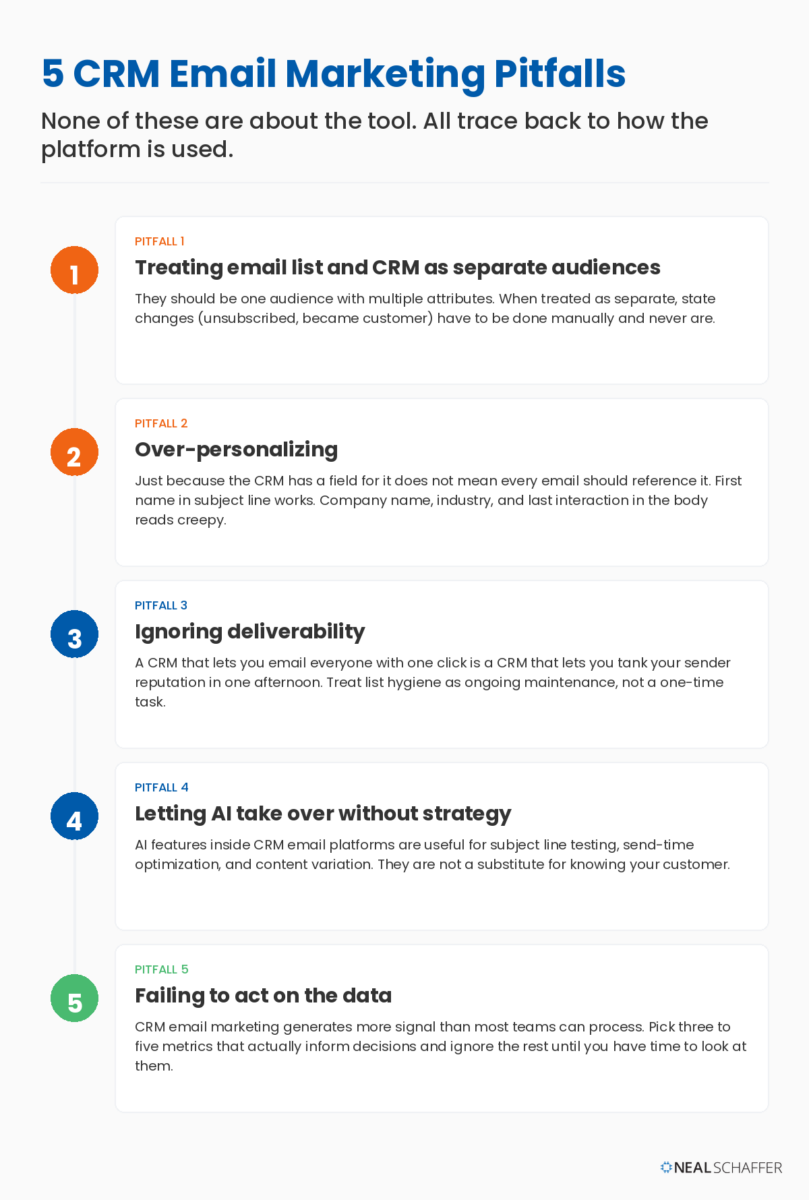
The first pitfall is treating the email list and the CRM as separate audiences. They should be one audience with multiple attributes. If a contact unsubscribes from marketing email but is in an active sales deal, the CRM should know and the rep should know. If a contact becomes a customer, they should automatically move out of nurture and into a customer segment. When the two systems are treated as separate, those state changes have to be done manually and they never are.
The second pitfall is over-personalizing. Just because the CRM has a field for it does not mean every email should reference it. Using a first name in a subject line works. Referencing the contact’s company name, industry, and last interaction in the body comes across as automated and slightly creepy. The McKinsey research is clear that personalization drives revenue, but it also notes that getting it wrong has lasting consequences for the brand.
The third pitfall is ignoring deliverability. A CRM that lets you email everyone with one click is a CRM that lets you tank your sender reputation in one afternoon. Segment by engagement, suppress non-openers periodically, validate your authentication setup, and treat list hygiene as ongoing maintenance, not a one-time task. I write more about this in my email deliverability post.
The fourth pitfall is letting AI take over without strategy. I cover this in detail in my AI email marketing post, but the short version is that AI features inside CRM email platforms are useful for subject line testing, send-time optimization, and content variation. They are not a substitute for knowing your customer.
The fifth pitfall is failing to act on the data. CRM email marketing generates more signal than most teams can process. Pick the three to five metrics that actually inform decisions (engagement-weighted open rate, click-to-conversion, revenue per recipient, list growth rate, unsubscribe rate by segment) and ignore the rest until you have time to look at them.
CRM Email Marketing FAQ
CRM email marketing is the practice of using your customer database (the CRM) to make every email more relevant. Instead of sending the same message to everyone on your list, you use what the CRM knows about each contact (their stage in the buying journey, their last purchase, their interactions with your team) to send segmented, personalized email at the right time.
A CRM stores customer records, deals, and the history of interactions across sales and service. An email marketing tool sends and tracks email campaigns. Some platforms (HubSpot, ActiveCampaign, Keap, Zoho) bundle both. Some specialists (Salesforce, Pipedrive) are CRM-first with email integration. Some specialists (Klaviyo, Brevo, Mailchimp) are email-first with light CRM features. The right choice depends on which function is more central to your business.
Most growing businesses do, but not always as separate products. If you are a solo consultant with a list under 5,000 and no real sales pipeline, a simple email service provider is enough. If you have sales reps, recurring customers, or any meaningful customer lifecycle, you need CRM functionality whether it lives inside the email tool or in a separate system.
For most small businesses, HubSpot’s free CRM plus Marketing Starter is a strong entry point. If you are running ecommerce, Klaviyo is a better fit. If you are a service business with appointments, Keap is worth the higher price. There is more on this in my email marketing for small business post.
For most small and mid-market businesses, HubSpot is significantly easier to deploy and operate. Salesforce wins for enterprise teams that already have a Salesforce investment, dedicated admin headcount, and complex B2B workflows. Salesforce is more powerful at the high end and harder to use at every end.
Entry-level all-in-one plans start at $9 to $20 per month (Brevo, ActiveCampaign Starter, HubSpot Marketing Starter). Mid-market deployments typically run $200 to $1,000 per month all-in. Enterprise B2B with Salesforce Marketing Cloud or Account Engagement starts around $1,250 per month and scales from there based on contact volume and feature tier.
For most small to mid-market businesses, expect a few months from contract signature to a working integrated workflow with clean data, defined segments, and live automation. Enterprise deployments take longer, sometimes well over a year. The single biggest variable is data quality at the start.
The Tool Decision Is Not the Strategic Decision
The strategic decision is whether you sell B2B or B2C, whether your customer data is good enough to drive personalization, whether your team is sized to maintain both systems, and whether you have a sales motion meaningful enough to justify the integration. Skipping that conversation and going straight to comparing pricing pages is how most tool stacks end up reflecting a decision that was never really made.
If you take one thing from this post, take this: the email list and the CRM are the same asset viewed two different ways. The tools should reflect that, not fight it. Whichever of the platforms above fits your scenario, the work is the same: clean data, meaningful segments, mapped fields, live workflows, closed feedback loop.
If you want help thinking through which pattern your business is in and what to do about it, I work with a small number of growth-stage businesses each year as a Fractional CMO. If you would rather hand the implementation to an agency, I keep a vetted directory of email marketing agencies at nealschaffer.com/clutch-email. And if you want the broader framework I use for digital marketing as a whole, Digital Threads is where it all lives.
For a deeper look at the strategy layer that should sit above any CRM email marketing decision, see my email marketing strategy post. That is the foundation I prefer to work through before any tool comparison.
Actionable advice for your digital / content / influencer / social media marketing.
Join 13,000+ smart professionals who subscribe to my regular updates.