




Every roundup you read about keyword research tools lists the same twelve or fifteen names, and every one of them sounds good. That is the problem. The question is not which tool has the longest feature list. It is which tool you will actually open on a Tuesday morning when you have a blog post to plan and forty minutes to do it in.
I have been publishing on this blog since 2008, and the last year of my life has gone into rebuilding that library one category at a time after a Google update hit it hard.
So I am not writing this as someone who tested a demo account for a week. I open one of these tools most working days, pay for it out of a small business budget, and have switched platforms once when the money stopped making sense. That work, and the Fractional CMO engagements where I keep finding the same neglected search fundamentals, is where everything below comes from.
In Digital Threads I argue that search is one of the three threads every small business has to pull, and keyword research is where that thread starts. Below are the eight tools worth your attention, what each one actually costs, and which ones I have never run so you know where my opinion stops and hearsay begins.
Key Takeaways
✅ Start with the free Google tools. They cost nothing, they come from the source, and most people quit before they have exhausted what those three give you.
✅ The paid decision is really one question: can your business absorb a monthly software bill in the low hundreds, or does it need to be in the low tens? That answer picks your tool for you.
✅ Ubersuggest is what I run. Semrush is the stronger platform and I would still recommend it to anyone whose budget can carry it.
✅ Question tools like AlsoAsked and browser extensions like Keywords Everywhere solve a narrow problem well. They are add-ons to a research stack, not the stack itself.
✅ Every tool on this list measures keywords. People are increasingly typing full sentences into AI assistants instead, and that gap is the biggest unsolved problem in this category.
A keyword research tool is software that tells you how many people search a phrase, how hard it would be to rank for it, what advertisers pay for it, and what those searchers are trying to accomplish. Everything else these platforms sell you sits on top of those four numbers.
Volume and difficulty are the two most people look at. I would argue the other two matter more.
Cost per click tells you whether a keyword has money behind it. When I pulled the phrase this post targets, it came back at over sixteen dollars a click. That is not a hobbyist term. Somebody is bidding real budget against it, which tells me the audience searching it has a business problem, not a curiosity.
Search intent tells you what kind of page Google will accept. A term classified as commercial wants a comparison. A term classified as informational wants an explanation. Get that backwards and you can write the best page on the internet and still not rank, because you answered a question nobody asked.
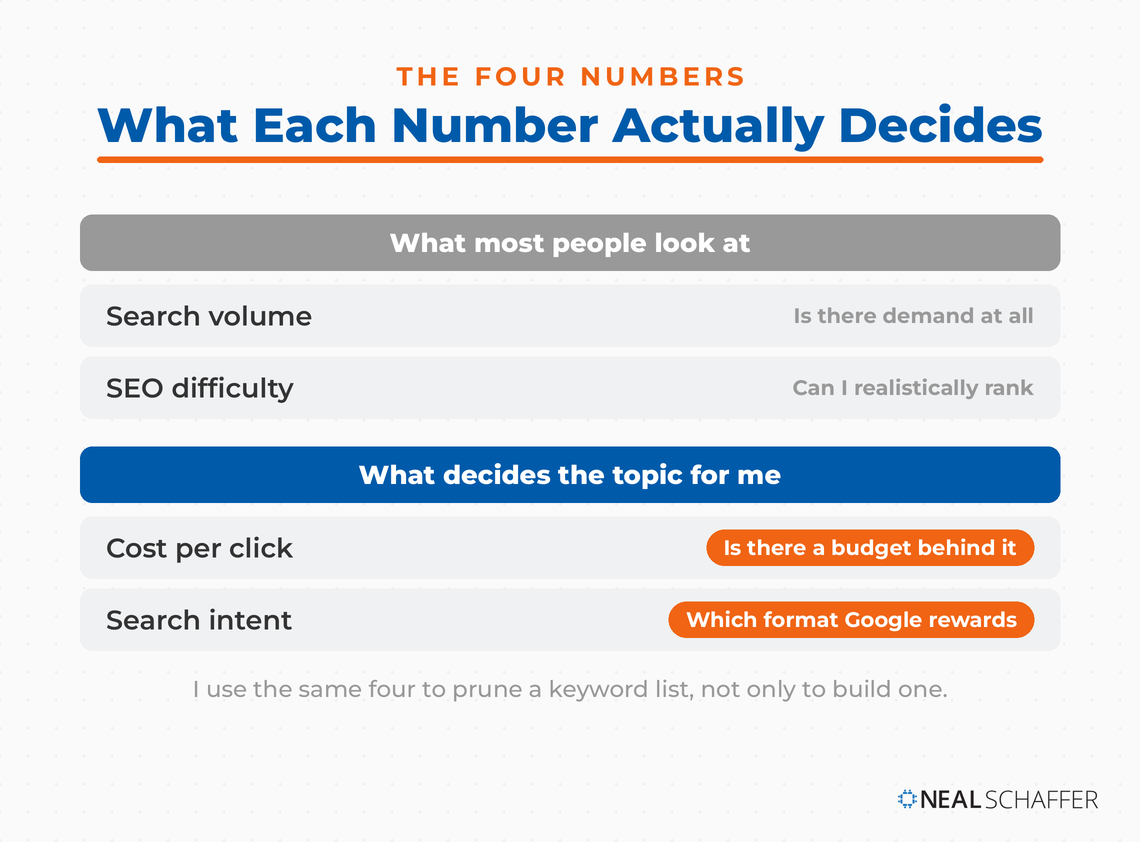
Pull all four together before you commit to a topic. Volume alone has sent more small businesses down the wrong road than any other number in this industry, and I cover the wider process in my guide to SEO keywords.
So which tools give you those four numbers, and what do they charge for them?
Three Google tools cover the basics at no cost: Keyword Planner for volume estimates, Search Console for the keywords you already rank for, and Trends for direction over time. Between them you can plan months of content without paying anyone. Most businesses I talk to have not come close to exhausting them.
1. Google Keyword Planner
My take on Keyword Planner is simple, and it is a position rather than a measurement. If you cannot afford an SEO tool, use this one. From what I have seen across the platforms I have paid for, the volume figures they sell you are estimates built on Google’s data, so you may as well take the estimate from the source.
Two things nobody warns you about, both stated in Google’s own documentation. First, you have to enter billing information and finish account setup before the keyword ideas feature works at all. Plenty of articles will tell you Keyword Planner is free even if you never buy an ad. True, and you still have to hand Google a payment method to get in the door.
Second, Google will not return results for keywords in sensitive categories like health or finance, which its advertising and privacy policies block. If you are in either industry, plan around that before you build a workflow on this tool.
Also worth knowing: forecasts refresh daily and are built on the last seven to ten days of data adjusted for seasonality. That makes them good for direction and shaky for planning a year out.
2. Google Search Console
Search Console is where I spend more time than any other tool on this list, because rebuilding a library means constantly checking what my own pages already earn rather than what a database estimates they might.
It is the only free tool here that reports on your site specifically. Every other tool is guessing about you. Search Console is not. If you have a site with any history at all, start here, look at the queries bringing you impressions but few clicks, and write for those before you go hunting for new terms. That is also the fastest way to find pages worth rebuilding rather than replacing.
I can show you what that looks like, because it is how this page ended up in front of you. Over six months the previous version of this post collected 10,482 impressions for “keyword research tools” and earned zero clicks from them, sitting at position 72.1. Its ten biggest queries all landed between position 47 and 75.
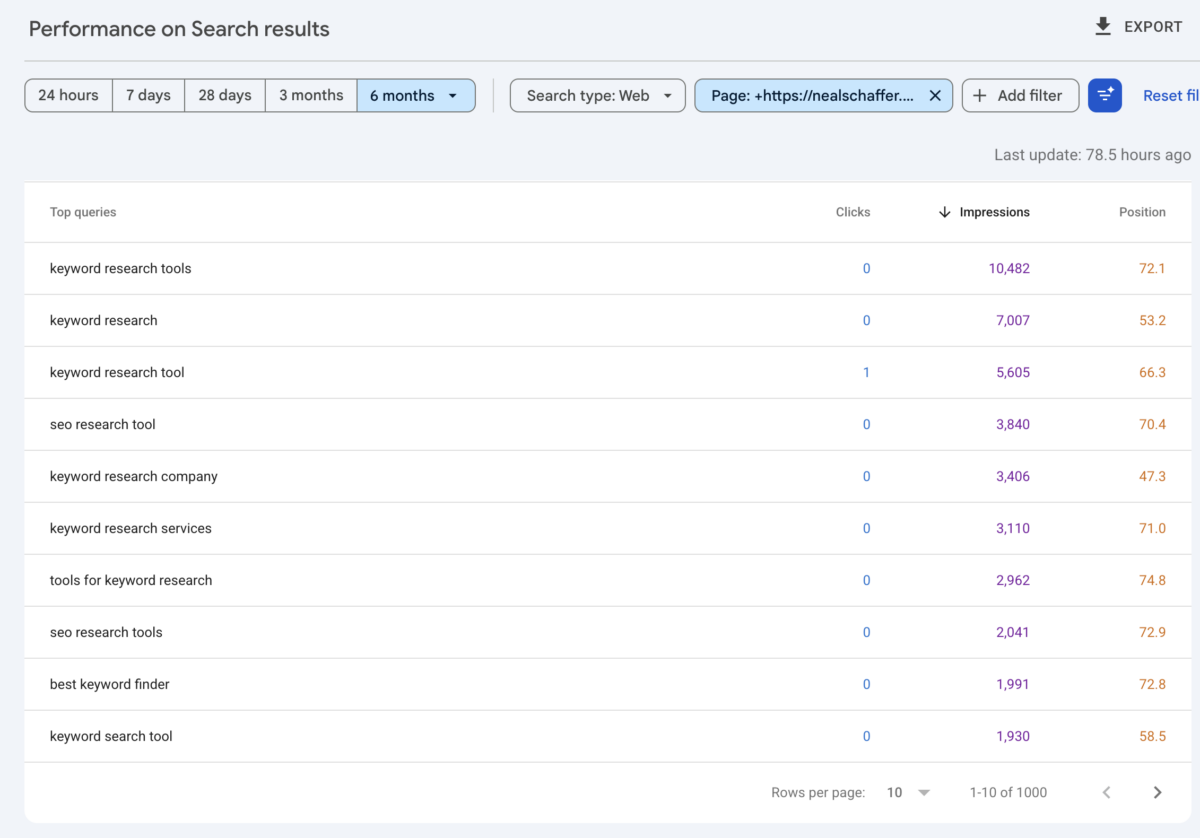
So the keyword research was never the problem. The terms were right and the page was on the fifth page of results, where nobody was going to find it. No amount of new keyword research fixes that, and seeing it in this report is what put this post in the rebuild queue.
3. Google Trends
I am not a heavy Google Trends user. Every once in a while I will check it as a sanity test on a trend I think I am seeing in keyword selection, and that is genuinely all I use it for.
Make LinkedIn Your Best Source of Clients
My latest book helps professionals, entrepreneurs, and business owners turn LinkedIn from a static profile into a real source of clients and growth.
Maximizing LinkedIn for Business Growth gives you clear, practical steps to build a profile that gets noticed and a network that actually sends business your way.
Grab your copy on Amazon and put it to work this week. Click the cover or the button below to get started.

Use it to answer one question: is interest in this topic going up, flat, or falling? It will not give you volume numbers, so do not go looking for them there. Direction is the job.
| Free tool | The question it answers | What it will not tell you |
|---|---|---|
| Keyword Planner | How many people search this, and what advertisers pay | Anything in a blocked sensitive category |
| Search Console | Which terms my own pages already show up for | Anything about a site you do not own |
| Google Trends | Is interest in this rising or falling | Absolute search volume |
Free gets you a long way. At some point, though, you want competitor data and rank tracking, and that is where you have to open your wallet.
Two paid platforms are worth most small businesses’ attention: Ubersuggest and Semrush. They do broadly the same jobs. The gap between them is depth of data on one side and monthly cost on the other, and for a small business owner that second number decides it.
4. Ubersuggest
Ubersuggest is my main keyword research tool, and it is the one I open first. According to its own pricing page, plans run from $29 to $99 a month across Individual, Business and Enterprise, with a one-time seven-day free trial on monthly subscriptions.
What you get at each tier just might matter more than the headline price. Keyword suggestions run from 20,000 to 100,000 a month. Rank tracking covers 125, 150 or 300 tracked keywords, and those allowances are per project rather than per account. I track more than that ceiling by buying add-on keyword packs, which is worth knowing if your library is bigger than one plan covers. Rankings update weekly on every tier, including the most expensive one.
That weekly refresh is the limit I would want you to know about before you buy. If you need to see a ranking move the day after you publish, the published spec says you will be waiting. For planning content and watching a library over months, weekly is genuinely fine.
My own dashboard updates daily, and I want to be careful about how I report that. It updates daily because I contacted Ubersuggest support, told them daily rankings mattered to how I work, and they arranged it for my account. That is an exception granted on request, not a feature on the plan I pay for.

So do not buy on the assumption you will get the same. Weekly is what the pricing page sells and weekly is what you should budget for. If daily movement genuinely matters to your work, that is a question worth asking before you subscribe rather than after.
One quirk from daily use: pull a keyword and its plural and you will often get identical volume and cost-per-click, because the tool treats them as one cluster, while the difficulty score still comes back slightly different for each. Do not read that difference as meaningful.
5. Semrush
Semrush is the better platform. I want to be clear about that, because I no longer pay for it and I do not want the two facts to get confused.
Per Semrush’s published pricing, the Pro plan is $139.95 a month, Guru is $249.95, and Business is $499.95. Pro covers 5 projects and 500 tracked keywords with 3,000 daily reports.
Historical data and the content marketing tools sit behind Guru, so that is a binary upgrade rather than something you can work around by using less. There is also a free plan, capped at 10 tracked keywords and one project, which is enough to look around and not enough to run anything.
Here is how the two compare on the numbers that decide the purchase:
| Ubersuggest | Semrush | |
|---|---|---|
| Entry price per month | $29 | $139.95 |
| Top standard tier per month | $99 | $499.95 |
| Tracked keywords, entry tier | 125 per project | 500 |
| Rank tracking refresh | Weekly on all tiers | Daily on paid tiers |
| Free option | Limited free account | Free plan, 10 keywords |
| Trial | 7 days, monthly plans | 7 days standard |
Look at the first row for a moment, because that ratio is the whole decision for most readers, and it is the one I had to make myself.
6. A Note on Ahrefs
Ahrefs shows up on every list like this one, and I am leaving it off mine for an unglamorous reason: I have never used it for keyword research. I have used the free Webmaster Tools account for site audits, and that is a different job. Recommending its keyword features would mean repeating what other people have written about them, which is exactly the thing that makes these roundups worthless.
That brings me to the story behind the tool I do pay for.
I made this exact choice in March 2024, and the reasoning is more useful to you than the verdict. I had been on Semrush for years through an industry partnership. When that ended and I had to price the tool as a customer, the decision came down to what a small business can carry every month.
One thing I learned in that process is worth spelling out, because it applies to anyone weighing a short trial. Competitor data, keyword lists and rank tracking are cumulative. Their value comes from the history sitting behind them. A couple of weeks of access is not a smaller version of an SEO platform. It is a broken one, because the moment your history resets you start from zero on the exact thing you were paying for.
So the choice in front of me was a full subscription or something else. I am a small business owner. A software line item in the low hundreds every month is a real decision, not a rounding error, and I suspect most people reading this are in the same position.
I looked at SE Ranking and a few others. Ubersuggest had the functionality I needed at a price I could justify, so I moved my SEO work, my teaching and my examples over to it and have been there since.
Two things I want to be straight about. Semrush remains the more capable platform, and if your budget carries it comfortably I would still point you there. And I am still a Semrush affiliate, so the link above earns me a commission. My choice was about budget, not about quality.
Not every research problem needs a full platform, though, which is where the narrower tools come in.
Three smaller tools come up constantly in this category: AnswerThePublic and AlsoAsked for the questions people ask around a topic, and Keywords Everywhere for pulling volume data into pages you are already looking at. All three are add-ons rather than replacements for a research platform.
7. AnswerThePublic and AlsoAsked
I have used AnswerThePublic. The visualizations are appealing and it never stuck with me, because I would rather look at a database or a spreadsheet I can sort than a wheel I have to read. That is a preference about how I work, not a criticism of the tool, and if you think visually you may take the opposite view.
Pricing here needs a warning. Most articles still quote AnswerThePublic’s old Individual, Pro and Expert tiers. The company’s own help documentation now describes three different plans, Starter, Growth and Business, running 100, 200 and 300 searches a month, with separate credit pools for its AI features and content tools. Lifetime plans are gone. Check the live pricing page rather than trusting a number in a roundup, including this one.
AlsoAsked is the tool in this category I hear about most from other marketers. I have not run it, so treat what follows as a description rather than a recommendation.
Its pricing page runs from $12 to $47 a month on annual billing, before tax, with free monthly searches for people who have not registered. Search history is where the tiers actually separate: 24 hours at the bottom, a month in the middle, a year at the top. On the cheapest plan, research you do not export the same day is gone.
8. Keywords Everywhere
Keywords Everywhere is the one I hear about most from people who do not consider themselves SEOs, which is a point in its favor. It sits in your browser and overlays volume, cost per click and competition onto pages you were already looking at. I have not subscribed to it.
The plan comparison explains its pricing model clearly, and the model is the thing to understand before you buy. You are buying credits, not a subscription to features, and one credit buys the data for one keyword.
Their own worked example is the useful part. A single Google search that displays 8 related keywords, 20 people-also-search-for keywords and 25 long-tail suggestions consumes 54 credits in one page load. Credits expire twelve months after purchase and there is no monthly billing option.
So the entry allowance of 100,000 credits sounds enormous until you leave the extension running through a research session. Budget for how much you browse, not how much you research.
| Tool | Best at | Entry price | Billing | Have I run it |
|---|---|---|---|---|
| AnswerThePublic | Visualizing the questions around a topic | See live pricing page | Monthly or yearly | Yes, did not stick |
| AlsoAsked | Mapping People Also Ask into a hierarchy | $12 per month | Annual, plus tax | No |
| Keywords Everywhere | Volume data overlaid where you already browse | $84 per year | Annual only | No |
Tools are only half of it. What you do with them week to week is where the results actually come from.
How I Use Keyword Research Tools to Maintain a Content Library
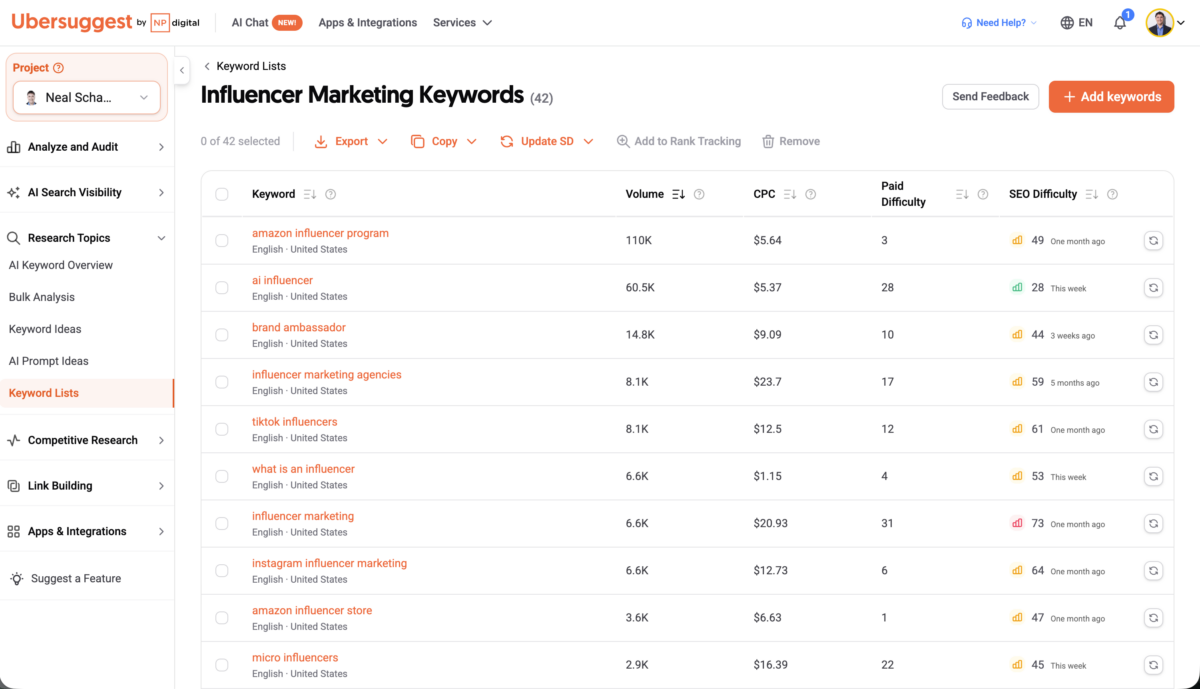
My main use for a keyword research tool is not finding new topics. It is maintaining the ones I already have. I build a custom keyword list for every category on this blog, then use those lists to watch for posts whose keywords are losing ground and to queue up what gets rebuilt next.
That reverses how most people describe this work. Discovery gets all the attention, and it is the easy half. Keeping several hundred posts pointed at terms that still have demand is the harder and more valuable job, particularly once a site has been running long enough for the ground to shift under it.
The lists do two things at once. They flag decay, which is the signal that a post needs rebuilding rather than a new post needs writing. And they hold the terms I want to target next, organized by category, so planning means picking from a list rather than starting a blank research session every time.
It pairs naturally with internal linking work, since a category you have mapped by keyword is a category you can also map by link.
What Happened to the 52-Keyword List in Digital Threads
I did a version of this exercise for the influencer marketing chapter of Digital Threads. The tool I was using at the time, Semrush, returned 14,172 keyword variations and 1,504 questions people ask about the topic. Nobody can write against fourteen thousand keywords.
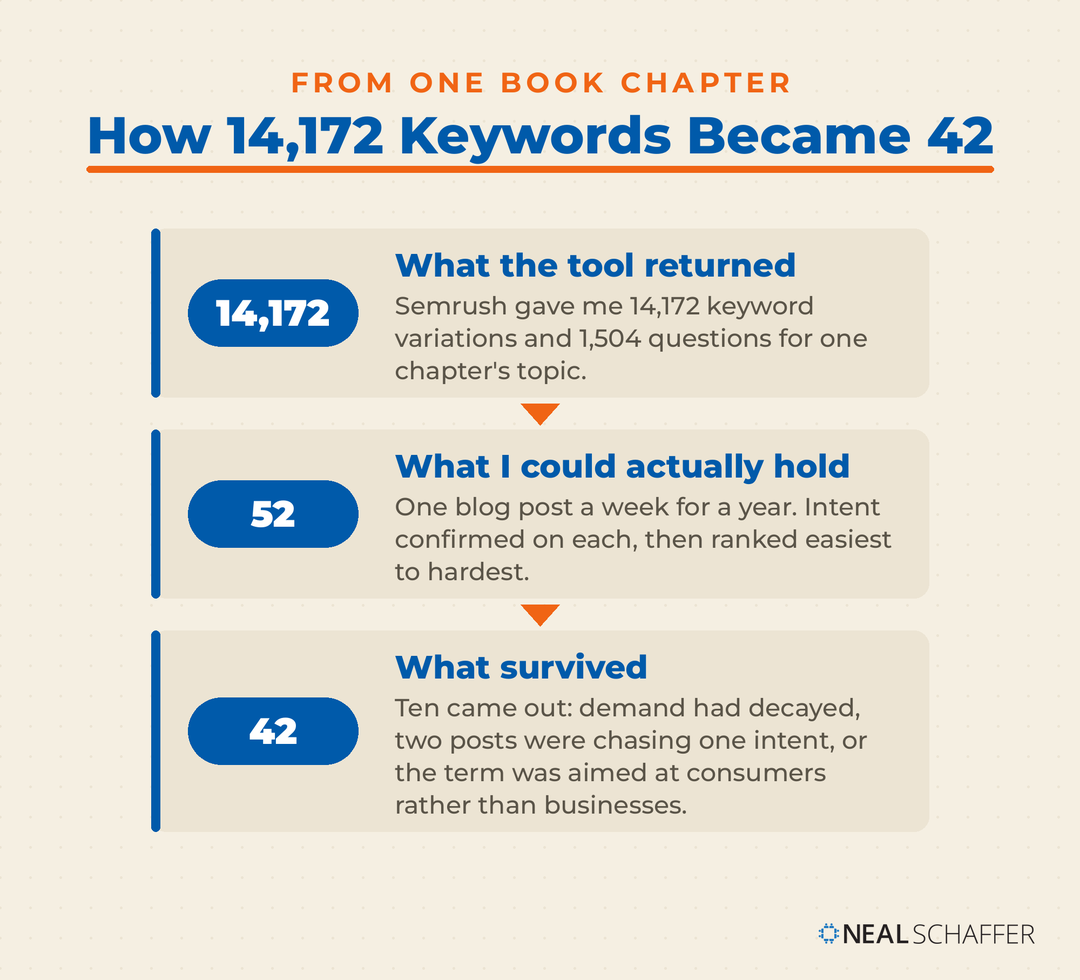
I cut it to 52, and the number was not arbitrary. As I wrote in the book, 52 keywords is one blog post a week for a year, which is a publishing cadence a small team can actually hold. I confirmed search intent on each one, then ranked them easiest to hardest by difficulty.
That was the hypothesis. The list is 42 now, and how it lost ten is the more useful half of the story. Some keywords had decayed and no longer had the demand behind them. Some were cannibalizing each other, two posts chasing one intent. And some turned out to be aimed at consumers rather than at the businesses I actually sell to.
I found all three with the same four numbers I opened this post with. Volume caught the decay. Comparing the terms against each other caught the cannibalization. And cost per click alongside search intent caught the consumer keywords, which is the pairing I said earlier does the work volume and difficulty cannot.
Where AI Fits in My Keyword Research
One more thing about my workflow, since it is where a lot of readers now expect AI to appear. I do not use AI to generate keywords. I use it to analyze the output I already have, whether that is data pulled from Ubersuggest or a Search Console export I upload as a spreadsheet.
The research still comes from a research tool. The reading of it is where the assistant helps, and I go deeper on that split in my post on AI SEO tools.
There is one limitation, though, that no tool in this category has solved yet.
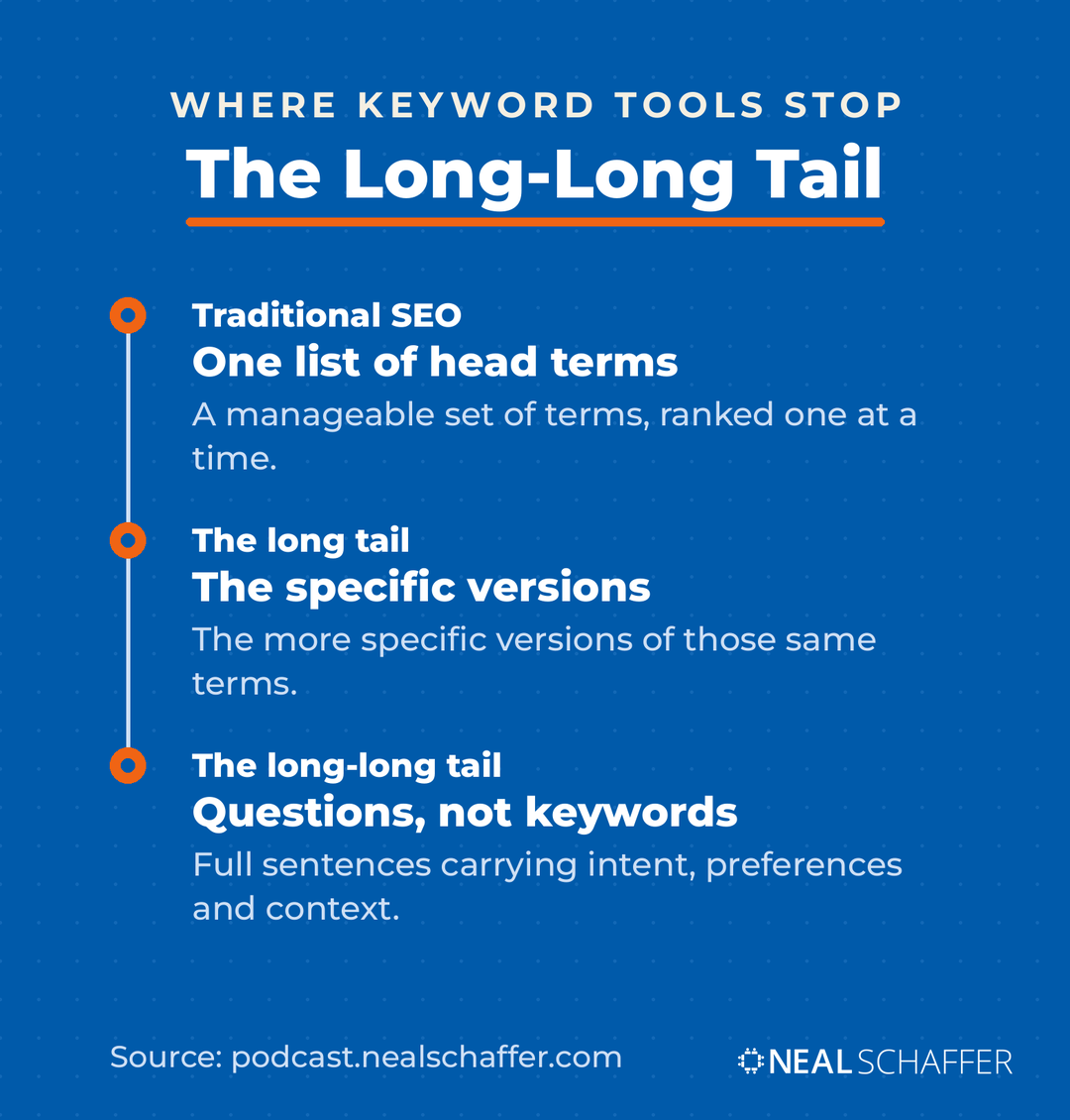
Every tool on this list measures keywords. But a growing share of searching now happens as full conversational prompts typed into AI assistants, and a database of keyword phrases has no clean way to represent that. It is the largest gap in this category right now, and no vendor has closed it.
On a December 2025 episode of my podcast Your Digital Marketing Coach, I worked through the kind of question people now put to ChatGPT or Perplexity, something like the best CRM for a freelance designer who hates subscriptions and needs client portals, and made the point this way: “That is not a keyword. That is a full sentence with intent, preferences, and context baked in.”
In that episode I called this the long-long-tail. Traditional SEO meant ranking for a manageable set of terms. Then came the long tail, where you targeted the more specific versions. Now the addressable question space has expanded to the point where the permutations are effectively endless, because an assistant answering one question may run many background searches to do it.
So your keyword tool is still necessary and is no longer sufficient. Use it for the terms that behave like terms. Then cover the questions around those terms in your actual content, which is where question research tools and your own Search Console query data earn their place.
I have written up what I measured on my own site in my post on AEO versus GEO.
None of which means everyone reading this should go buy something.
Some people should close this page without subscribing to anything. If you publish less than once a month, if you have not connected Search Console yet, or if your traffic problem is that you have almost no content rather than the wrong content, a paid tool will not fix it and may distract you from what will.
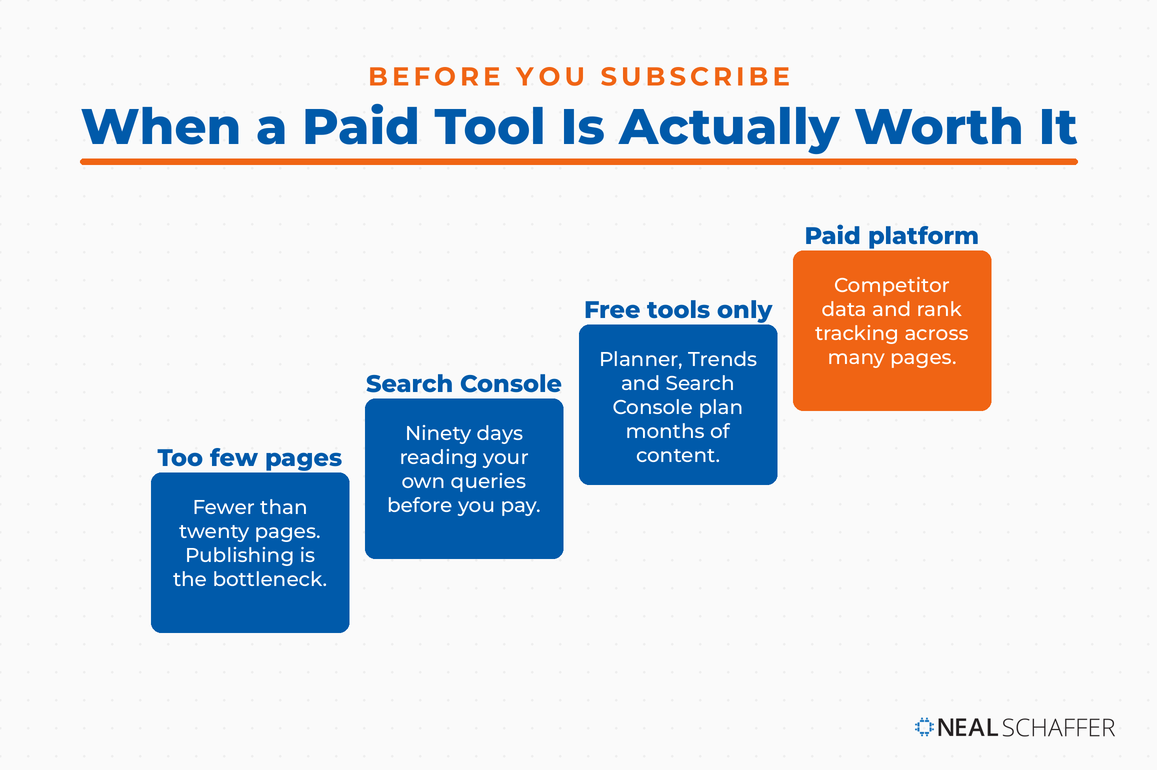
Three situations where I would tell you to wait.
You have fewer than twenty pages on your site. Your bottleneck is publishing, not research. Write, and come back to this decision in six months.
You have never opened Search Console. You have free data about your own site sitting there unread. Spend ninety days with it before you pay for estimates about everyone else’s.
Buying a tool is standing in for doing the work. This is more common than anyone admits. A subscription is not a strategy, and the dashboard will happily give you something to look at every day while nothing gets published. If that sounds familiar, my post on how to do SEO is a better use of the next hour than a free trial.
If none of those describe you, the choice comes down to what your business can carry each month, and I would rather you master one tool than half-use three.
Frequently Asked Questions
Google Keyword Planner, for the reason given above about where the paid tools get their estimates. Pair it with Search Console for the terms you already rank for. Be aware you have to add billing information to your Google Ads account before the keyword ideas feature will work.
Not to start. If you publish occasionally and run a small site, the free Google tools will carry you further than most people expect. The moment to pay is when you need competitor keyword data and rank tracking across many pages, because those are the two jobs the free tools genuinely cannot do.
For my work, yes, and I have used both. Semrush has more depth and I would recommend it to anyone whose budget absorbs it comfortably. Ubersuggest covers keyword research, competitor analysis and rank tracking at a fraction of the monthly cost. What you give up for that price is data depth and refresh speed.
Start with the questions your customers actually ask you, then check them against a research tool for demand. Question-focused tools and your own Search Console queries surface more of these than a volume-sorted keyword list will, because the most valuable long-tail terms often have volume too low for a database to report. I go deeper on this in my post on long-tail keywords.
For new content, every time you plan a post. For existing content, I would treat it as a standing maintenance job rather than a project, checking a category at a time for terms that have lost ground. Search demand moves, and a post targeting a term that has faded will quietly decline for months before anyone notices.
Start With What You Already Have
Before you subscribe to anything, do three things in order. Connect Search Console and read the queries bringing you impressions without clicks. Open Keyword Planner and pressure-test the topics you were already planning to write. Then check intent on each one by searching it yourself and seeing what Google already rewards.
If you get through all three and still hit a wall on competitor data or rank tracking, then buy something. Ubersuggest if your budget is tight, which is where I landed. Semrush if it is not, which is where I would still point you.
Once you have picked a tool, the work is putting it to use consistently, and my post on SEO strategy lays out the sequence I follow. If you want the wider picture of how search fits alongside your email and social channels, that is the argument of Digital Threads, and you can grab a free preview. And if you would rather have someone build and run this alongside your team, that is what my Fractional CMO services exist for.
For the wider numbers behind all of this, the SEO statistics I maintain are worth a bookmark, and the rest of my SEO marketing work sits alongside them.

Improve Your SEO Through Guest Blogging
We respect your privacy. Unsubscribe at anytime.