




Pinterest is one of my most used social media sites. While I love the buzz of TikTok, the inspiration I find on Instagram, and the opportunities for learning on LinkedIn, I often need to take breaks from the major platforms. But never Pinterest. No matter where I’m at in my life, there’s always something I need from the visual search engine.
I’ll often hop onto the app or website with a specific query in mind — “living room decor,” “capsule wardrobe,” and “productivity tools” are some of my most recent searches. As you’ll have guessed from those examples, I usually open up the Pinterest app with one of three goals:
- Find inspiration
- Figure out how to do something
- Buy something
And I’m not unique in this, either — according to data from Pinterest, more than 85% of users have made a purchase based on pins from brands.
Pinterest boasts 619 million global active users, making it one of the most popular social networking platforms in the world. But it’s how those Pinterest lovers use the app that’s worth paying attention to. According to a 2024 report by DataReportal, 36.6% of active users are on the app to follow or research brands and products, making it the main reason they use Pinterest.
So, if you’re a business or a creator looking to monetize, using Pinterest as part of your marketing efforts is well worth exploring.
Convinced yet? Good — because learning to use Pinterest is straightforward, even if you’ve never opened the app. In short: to use Pinterest, you create an account, build themed boards, save the ideas you find (or make) as pins, and — if you’re a creator or business — optimize those pins with keywords so they show up when people search.
Below, I’ll walk you through setting up your account, creating pins and boards, growing an audience, and measuring what’s working.
Key takeaways
- Pinterest has 619 million active users, and 85% of them have made a purchase based on pins from brands.
- 36.6% of active Pinterest users are there to research brands and products — more than YouTube, X, or LinkedIn.
- Business accounts unlock analytics, advertising, product catalogs, and the business/creator hub — switch from personal if you’re marketing, selling, or creating.
- Pinterest is a long-game platform — a pin can keep getting attention and driving traffic for months or years after it’s published.
- The ideal pin is vertical — 2:3 aspect ratio at 600 x 900 pixels — with a strong keyword in the title, a clear call to action in the description, and a link back to the source.
- Pinterest’s best-performing niches include home decor, beauty, wellness, fashion, food, DIY and crafts, parenting, weddings, travel, and education.
- Focus Pinterest analytics on four metrics — impressions, pin clicks, saves, and outbound clicks.
- Plan for trends around early — Pinterest users come to the app well before the season, holiday, or event they’re planning for.
What is Pinterest?
Pinterest is a visual discovery engine — a social media platform that works like a virtual pinboard, where users save and organize ideas as visual cards (pins) on collections (boards). Pinterest describes itself as “a visual discovery engine for finding ideas like recipes, home and style inspiration, and more.”
Brands, creators, and private users can create pins by uploading an image or video from their devices. Each pin can have its own title and description and a website link (important for brands and creators looking to drive traffic elsewhere). Users can also save pins of images they find online with Pinterest’s browser extension.
All Pinterest users, whether they have a business or personal account, have a profile where others can see their Pinterest boards and pins (unless they choose to make a board private).
Beyond the mechanics, I love this definition Pinterest marketing expert and agency owner Heather Farris shared with Buffer: “If Google Images and Instagram were to have a baby, you’d land on Pinterest.”
Before we get into strategy, let’s cover a few key terms.
Pinterest terms to know before you start
Before diving in, a quick glossary — you’ll hear these terms across the rest of the guide:
- Pin — an image or video saved to Pinterest, usually with a title, description, and destination link.
- Board — a themed collection of pins (e.g., “Small kitchen inspo,” “Q2 product launches”).
- Pinboard — another word for a board; Pinterest uses it interchangeably.
- Rich pin — a pin that automatically pulls extra info from the linked website (used for recipes, products, and articles).
- Idea pin — a multi-page pin format designed for step-by-step content and stories.
- Save — when a user adds a pin to one of their boards.
- Repin — saving someone else’s pin to your own board.
- Home feed — the personalized feed of pins Pinterest shows when you open the app.
- Pinterest Analytics — the native dashboard (business accounts only) with reach, engagement, and click data.
- Pinterest Trends — Pinterest’s free tool for seeing what’s gaining search momentum on the platform.
The benefits of Pinterest for businesses and creators
Like other social media platforms, Pinterest can be a powerful marketing tool for reaching new followers. It can help:
- Increase brand awareness
- Drive website traffic
- Increase sales and conversions
Heather says Pinterest is like a search engine that drives new customers to businesses and creators. “It has allowed them to thrive,” she says. “Pinterest users are different from others because they have a higher intent to purchase and often spend more money per purchase.”
“Pinners are also planners, so they are very meticulous about how they use this platform, carefully organizing their Pinterest pins into curated boards they can refer back to later,” she adds.
Another point in Pinterest’s favor: because of how the algorithm (content ranking) on Pinterest works, users don’t have to follow you to discover your content, nor do your pins have to be very new for them to be recommended. “They can simply search for something, and if you’ve done your research and optimizations correctly, you have the chance to show up right when they search for you,” Heather says.
Unlike other social media sites, older content, if well-optimized, isn’t immediately excluded — that’s not how Pinterest works. This means your pins could continue gaining traction months or even years after you first publish them. “Pinterest will send you traffic for the long run,” Heather says. “I have personally made pins for my brands that, five, six, or seven years later, are still bringing people to my website.”
Who uses Pinterest? (And which niches perform best)
Pinterest tends to perform best for businesses and creators in visual, aspirational, or how-to niches. Heather says Pinterest is a must if you work in one of the categories below. “I have worked with brands across all these categories, and they have all seen success in some form or another.”
- Home decor/interior design
- Beauty
- Wellness
- Fashion
- Children’s activities
- Parenting
- Design
- DIY and crafts
- Food
- Gardening
- Health
- Mindset
- Wedding
- Travel
- Education
Pinterest personal vs. business account: which one do you need?
Pinterest offers both personal and business (professional) accounts. There are some key differences between the two.
“Personal and business accounts on Pinterest are similar, but business accounts include features that are helpful to business owners and marketers,” the platform says. Here’s what each account type gives you:
| Feature | Personal account | Business account |
|---|---|---|
| Save and organize pins | Yes | Yes |
| Create boards | Yes | Yes |
| Pinterest Analytics | No | Yes |
| Advertising (idea ads, video ads, carousels, collection ads) | No | Yes |
| Product catalogs | No | Yes |
| Pinterest Business Hub / Creator Hub | No | Yes |
| Best for | Saving ideas for personal use | Creators, businesses, marketers |
A personal Pinterest account is great if you’re just using it to save ideas for later. If you’re using Pinterest as a creator, business, or marketer, a Pinterest business account is your best bet.
Good news if you’re just exploring the platform or already have a personal account: you can switch to a business account or connect a business account to your existing personal profile.
How to create a Pinterest personal account
Here’s how to create a Pinterest personal account from scratch:
- Navigate to Pinterest.com.
- From the top-right of your screen, click Sign up.
- Enter your email and date of birth and create a password.
- Click Continue.
- Follow the prompts to enter your personal details.
- Click on the relevant tiles to choose your interests, then Continue to your feed.
- Start exploring pinning. The more you pin, the better the recommendations on your home feed will be.
How to create a Pinterest business account
To create a new business account not tied to a personal account:
- Navigate to Pinterest.com.
- From the top-right of your screen, click Sign up.
- At the bottom of the pop-up, click Create a business account.
- Enter your email, create a password, and enter your date of birth.
- Click Create account.
- Follow the prompts to fill out your profile.
- Choose what you’d like to do first (create a pin, create an ad, or build your profile), and click Next.
How to create a pin
There are a few ways to create a pin — I’ll walk you through all of them. (We’ll cover boards in the next section; you can create pins first and organize them later, or build your boards first and pin into them. Totally up to you.)
On your computer
- Log in to Pinterest.com.
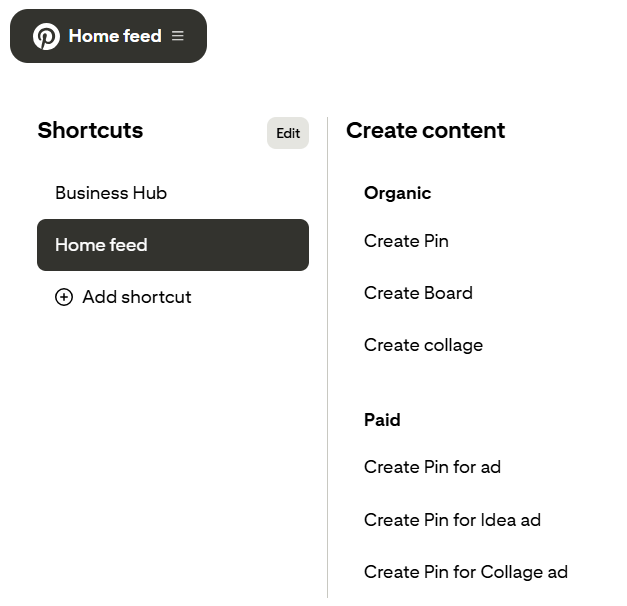
- If you have a personal profile, choose Create on the top left of your screen.
- If you have a business account, click the hamburger menu (three lines) on the top left, then Create Pin.
- Drag and drop an image or video from your computer or click the arrow icon to open your folders. You can also choose the Save from URL button under the image upload icon to grab an image or video from a web page.
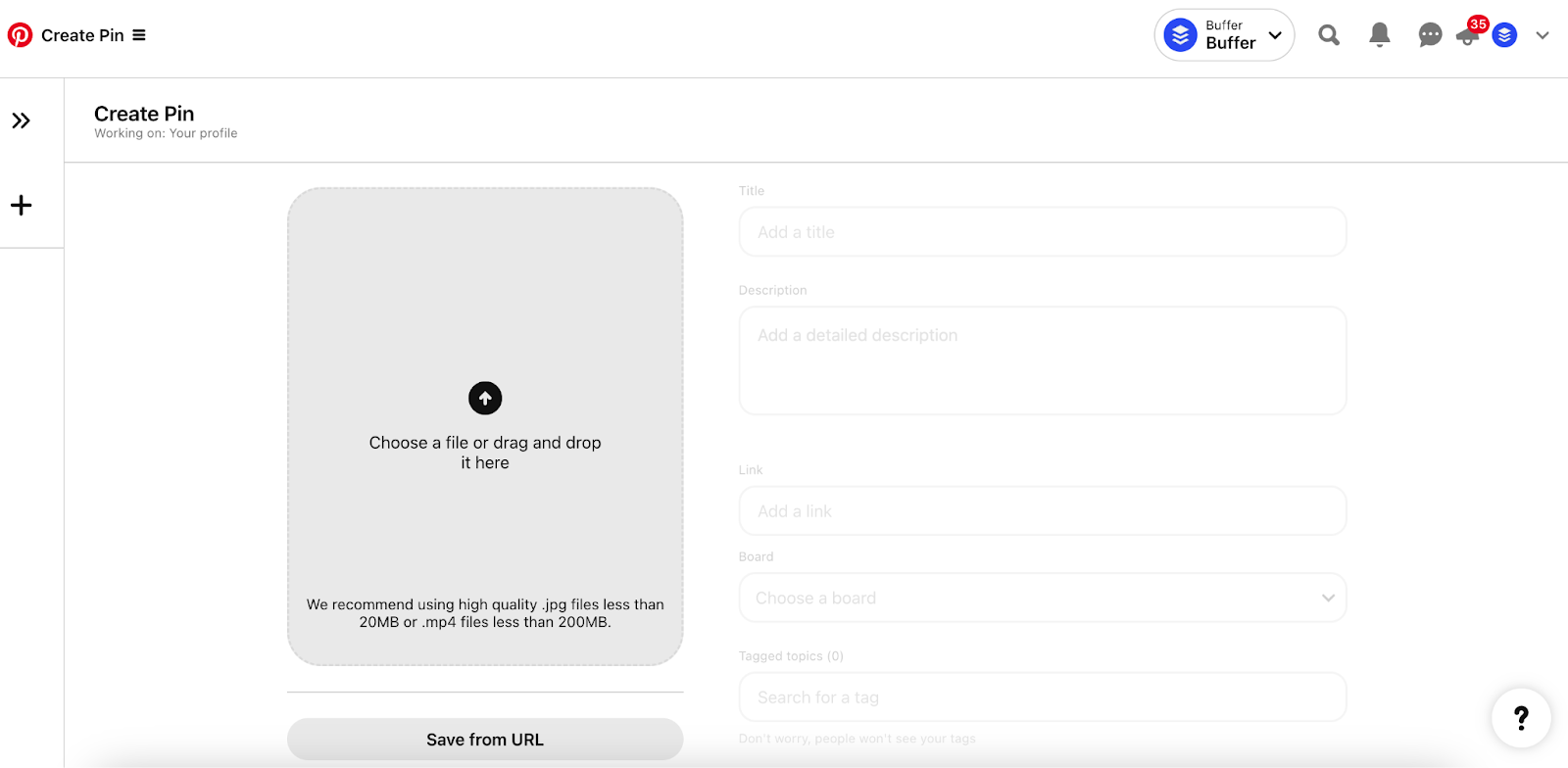
- Here, you can add information about your pin, like a title, description, related topics, the board you want to save it to, and a website link. Choose More options to turn comments and shopping recommendations on or off.
- When you’re ready, click Publish.
On your mobile device
- Open the Pinterest app.
- Click the + button at the bottom of the app.
- Choose Pin.
- Select a photo or a video from your gallery and hit Next.
- Add a title, description, and link (optional).
- Choose a board to post on, add relevant tags, choose when you want to post, and hit Create.
Pinterest Save extension
One of the easiest ways to pin content to your boards from around the web is to pin it with the Pinterest Save extension or browser button. Here’s how to install and use it:
- Go to Pinterest’s Save extension page here and choose where to use the button (Chrome, Firefox, Safari, or Microsoft Edge).
- Navigate to the appropriate browser store and follow the prompts.
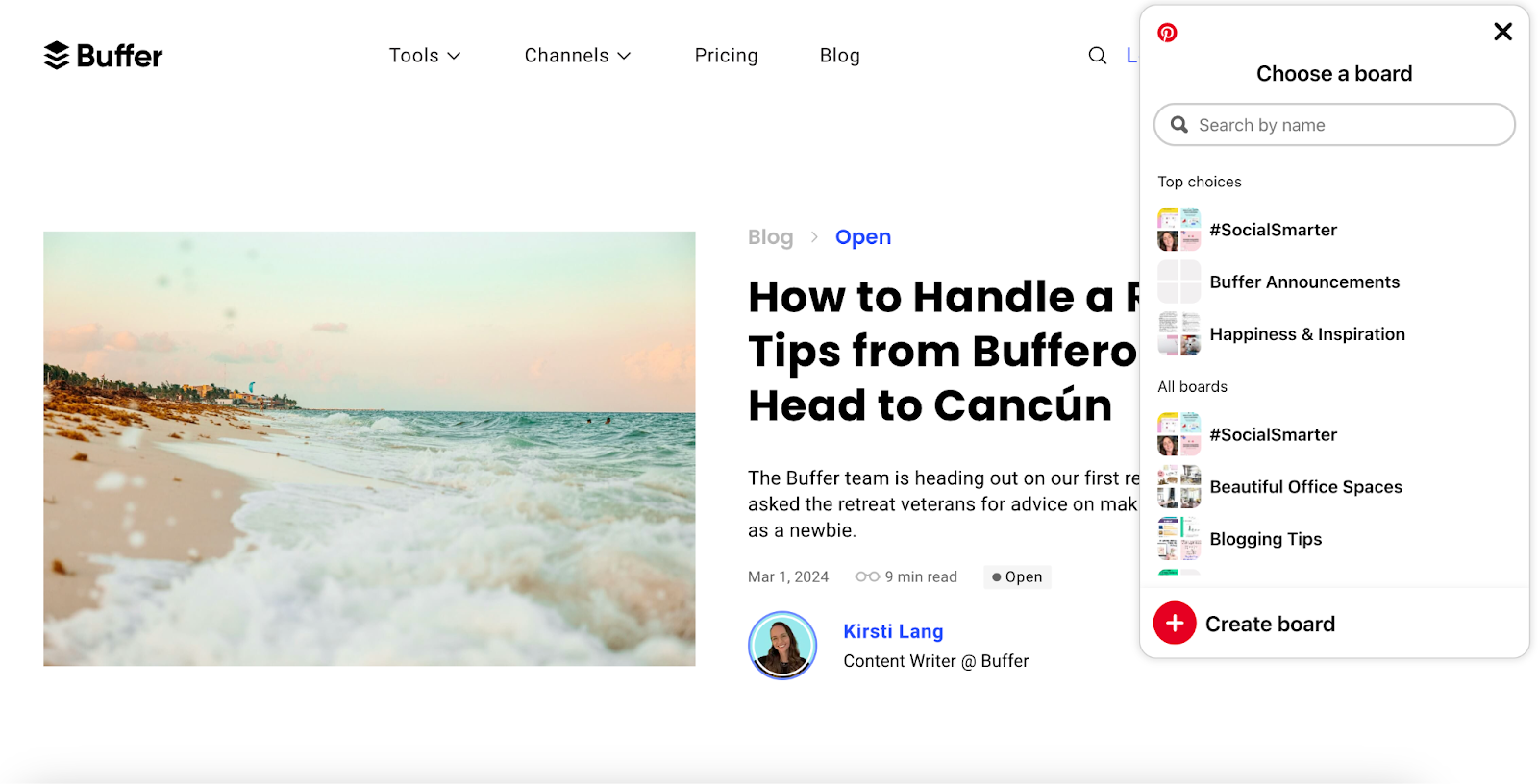
- Once installed, the Pinterest save icon will appear whenever you hover over an image on a website. Click on it to pin an image, then choose or create a board to save it to.
- Click View on the pop-up that appears to edit the image title, description, and more.
Create a pin with Buffer
The handy thing about scheduling a pin with Buffer is that you can cross-post it to other platforms in the same flow — so if you’re already planning an Instagram post, you can send it to Pinterest, TikTok, or Facebook without reopening a new tab.
You can schedule the pin to automatically publish at a specific time or share immediately. To start pinning with Buffer:
- Make sure you’re logged into the Pinterest account you want to connect.
- Sign up or log in to Buffer. Click the +New button on the top left and click on Connect a New Channel.
- Scroll down and click on Pinterest. Click Give access. Congrats, your Pinterest account is all set up.
- Click the + New Post button and choose Pinterest.
- Upload your image or video with a title and destination link (optional).
- Select the board/s you want to save your new pin to.
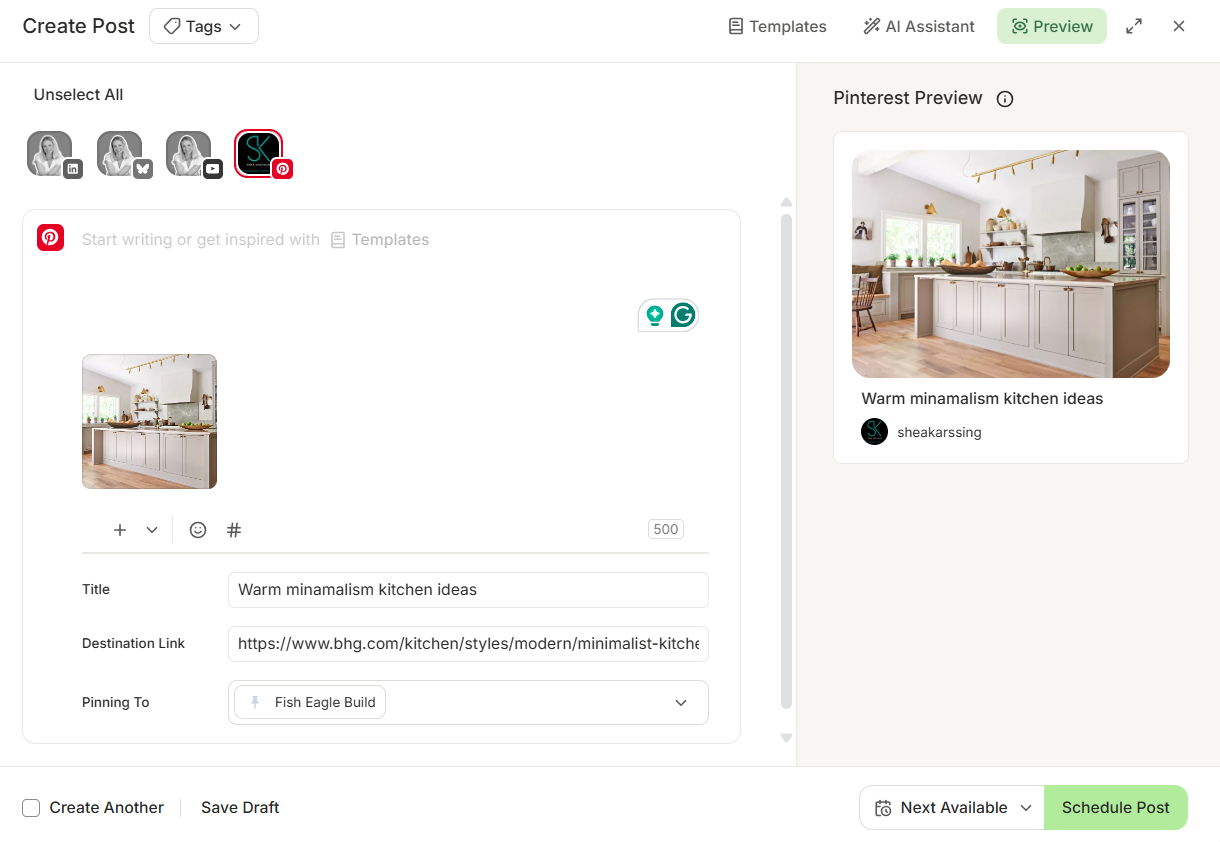
- Click Schedule Post button to set a specific publishing date and time, choose Next Available, or click the dropdown arrow for more options.
- If you want to cross-post this image or video to your other social media channels, click on the appropriate icons at the top of the window.
⚡
Pro tip: if you want to automatically pull through an image on your destination website, enter the URL in the Destination link box first — Buffer will find the available images automatically
How to create a board
A well-organized Pinterest profile is one way to optimize your profile (more on this below) and make it more appealing to your target audience.
Create a board on desktop
- Log in to Pinterest.com.
- If you have a personal profile, choose Create on the top left of your screen.
- If you have a business account, click the hamburger menu (three lines) on the top left, then Create Board.
- Choose a name for your board, add collaborators, and toggle Make this board secret on to create a private board.
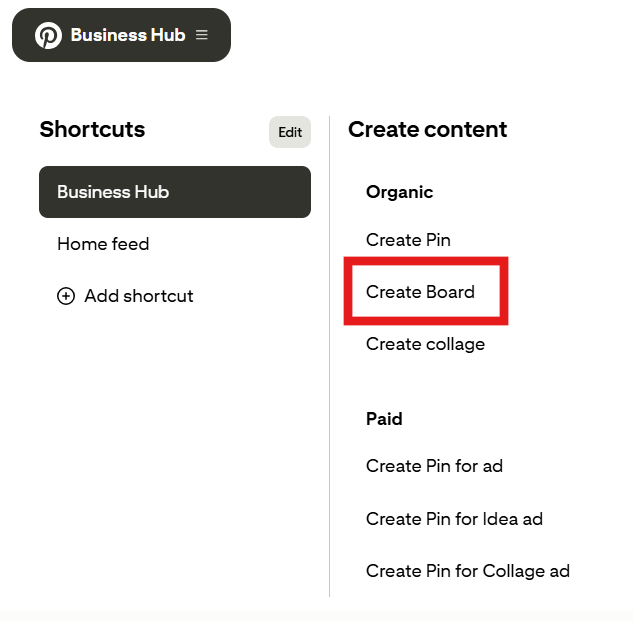
Create a board using the Pinterest mobile app
- Click the + button at the bottom of the app.
- Choose Board.
- Choose a name for your board, add collaborators, and toggle Make this board secret on to create a private board.
- Add suggested pins to your board (you can choose to add these later, too).
Your board is created, but you’re not done yet (don’t miss this step if you’re a small business or creator). Choose the three dots to the top right of your new board, then Edit board. Here, you can edit each board’s individual settings, including name, description, board cover, and more.
Tips for creating a Pinterest board
- Choose an eye-catching board cover image
- Add a description that features important keywords in your niche
Filling out these details for each board will help with SEO (search engine optimization) and provide users with additional context about your account content.
💡
How to use Pinterest for business and creators: 13 tactics that work
You’ve created a new business account and started creating pins and boards, but there’s a whole lot more to using Pinterest for business. Be sure to include the tactics below in your social media marketing strategy for Pinterest to grow your following.
| Tactic | Key action |
|---|---|
| Optimize your profile | Match business name, photo, username, and description to your brand across platforms |
| Find your audience | Focus on a narrow niche — the Pinterest algorithm favors it over broad targeting |
| Use eye-catching, uncluttered images | High-quality, bold, on-brand visuals — avoid pixelation or clutter |
| Don’t forget about video | Design for mobile in square or portrait; short for discovery, long for tutorials |
| Use a vertical aspect ratio | Ideal pin is 2:3 (600 x 900px); square (600 x 600px) works too |
| Consider adding a little copy | Add short text overlays when the image alone doesn’t land the message |
| Provide helpful, detailed pin descriptions | Use descriptions plus a CTA verb (“shop,” “make,” “find,” “buy”) to drive clicks |
| Pinterest SEO: Use solid, well-researched keywords | Keywords in pin and board titles and descriptions — but never keyword-stuff |
| Add relevant hashtags — carefully | Focus your effort on keyword-rich descriptions and treat hashtags as optional add-ons |
| Always include links | Every pin should link to the source, even if it’s not your site |
| Get ahead of trends | Start pinning seasonal content well before the event |
| Repurpose the right way | Strip watermarks and copyrighted music before cross-posting to Pinterest |
| Be patient, stick with it | Pinterest content keeps growing for months or years, not 24–48 hours |
Optimize your profile
Completing your profile is a key step in ensuring that your account is discoverable and looks appealing to users on Pinterest.
💡
Pro tip: Make sure that your business name, profile picture, username, and description all match your brand identity across other social media networks.
Find your audience
Like many other social media networks, focusing on a niche group of highly engaged users will produce better results than targeting a broad, unspecified audience.
If you focus on sharing consistent content within your niche, people will start to look to you as a continual source of inspiration and information. Focusing on a niche audience will also produce favorable results within the Pinterest algorithm.
Use eye-catching, uncluttered images
Pinterest is a visual-first platform, so a good image can make all the difference in maximising results. I’ll scroll right past a fuzzy stock photo — and so will your audience. Images that stand out, are colourful and unique, and say something specific about what you offer will give you a significant edge compared to other content on the platform.
You’ll also want to steer clear of cluttered images. Many Pinterest users will be viewing your pins on the app, so make sure the message is easy to digest (and that text is legible in the desktop feed and on smaller, mobile formats).
Don’t forget about video
Video content on Pinterest can be an incredible way to bring your ideas to life. They’ll also auto-play and stand out in users’ feeds.
Our research showed that videos get more engagement on Pinterest than images, so consider testing a few video pins on your account.
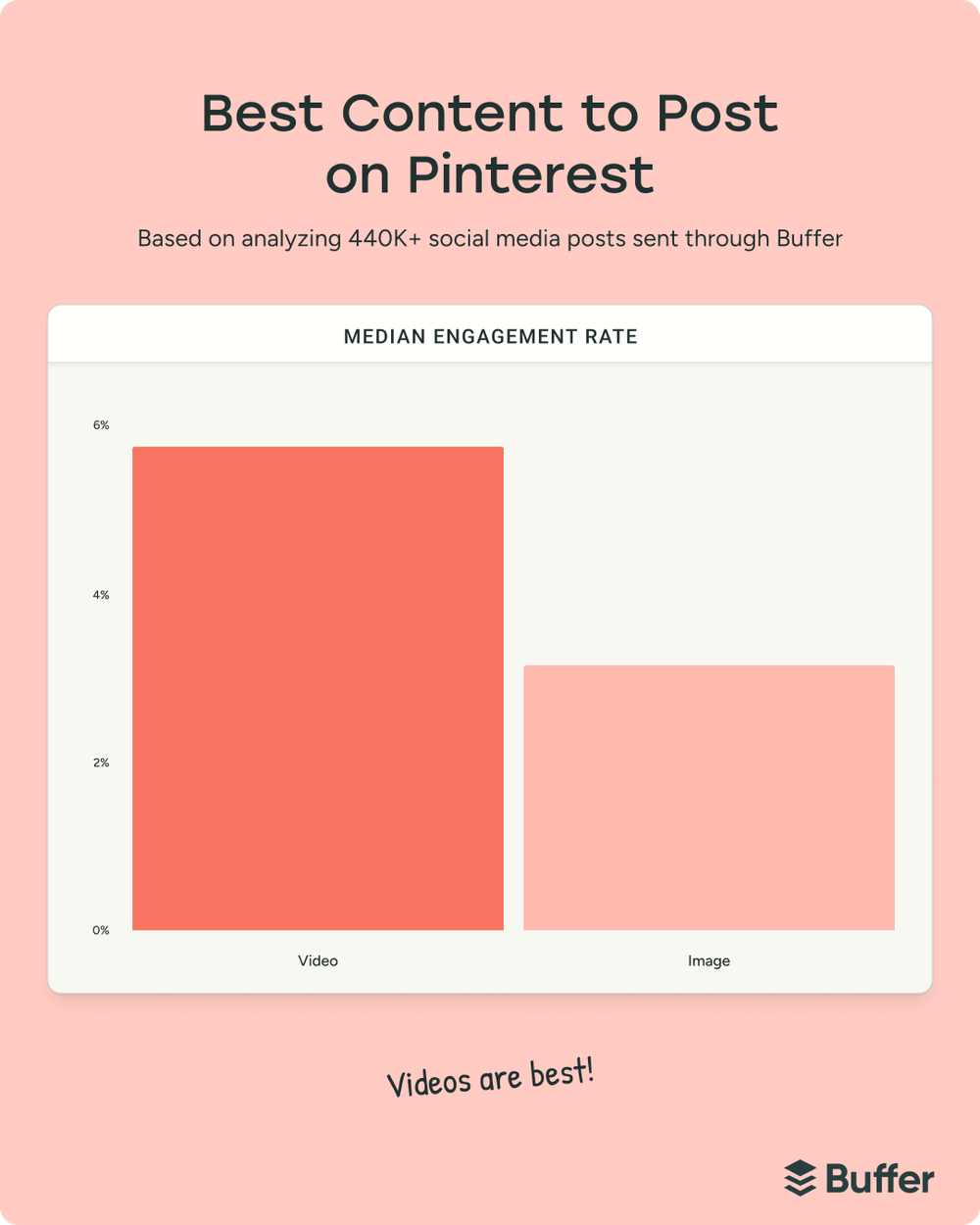
Pinterest video tips
- To use up as much screen space as possible, ensure your videos are designed for mobile and exported in either square or portrait format.
- Shorter videos work best when you want users to discover you (if your goal is awareness or storytelling).
- Go longer when you want people to do something with your idea — great for education or tutorials.
Use a vertical aspect ratio
Pins in the home and search feed are organized into columns, so vertical images take up more space and stand out more in the feed. Recommended Pinterest image specs:
- Vertical pin (recommended): 2:3 ratio, 600 x 900 pixels
- Square pin: 1:1 ratio, 600 x 600 pixels
Consider adding a little copy
If your image doesn’t give enough context, add text to the image to help land your message. But try to keep the copy simple and not clutter the overall image.
Provide helpful, detailed pin descriptions
Pins with descriptions drive more clicks to your site than those without. If your objective is to drive clicks, use the description to hint that there’s more to see on your website — don’t give everything away on Pinterest, just enough to pique a user’s curiosity.
A strong call to action (CTA) — like “shop,” “make,” “find,” or “buy” — will encourage people to take the next step.
Pinterest SEO: Use well-researched keywords
Leaning on keywords is a vital part of any good Pinterest strategy. “You cannot overlook keywords on Pinterest if you want to create a sustainable long-term Pinterest presence,” Heather says.
Consider users’ search intent when they are looking for Pinterest content like yours. What are they likely to be looking for? What words and phrases are they typing into the search bar?
Pinterest’s search function can help you find new keywords if you’re stuck. For example, if your pin is a roast chicken recipe, search for “roast chicken” on Pinterest. You’ll see suggested searches for “roast chicken whole” and “roast chicken oven,” and search guides like “simple” or “cast iron.” These free SEO tools can help, too.
These keywords should be used in your pin title and description, as well as titles and descriptions for your boards. The more information you give the Pinterest algorithm about your content, the better.
That said, don’t simply dump keywords into the various fields and hope for the best. Keyword stuffing looks spammy and can be off-putting for your audience.
Add relevant hashtags — carefully
Hashtags still exist on Pinterest — but they’re no longer a way to supercharge your reach. Pinterest functions more like a visual search engine, meaning keywords in your title, description, and boards matter far more than hashtags.
That said, hashtags can still play a supporting role when used sparingly and strategically.
- Stick to 2–5 highly relevant hashtags max.
- Place them at the end of your description, not in the middle.
- Choose clear, searchable terms that align with your keywords.
- Avoid overloading — too many hashtags can look spammy and dilute performance.
Most importantly, focus your effort on natural, keyword-rich descriptions first, and treat hashtags as optional add-ons.
Always include links
Many people save pins as their visual, digital bookmarks to help guide them back to a site they want to see again. So when they click on a pin, they expect to be taken to a landing page to learn more about the idea or information you shared on Pinterest.
That means making sure your Pinterest content includes a relevant link to the source every time — even if the link doesn’t lead to your website.
A few quick best practices for the links themselves:
- Use the full URL rather than a link shortener. Pinterest can flag shortened URLs as spammy, and some have been blocked outright in the past.
- Match the pin image to the page it leads to. If someone clicks a pin of a living room and lands on a generic homepage, they’ll bounce — and Pinterest notices.
- Add UTM parameters so you can see Pinterest traffic clearly in Google Analytics or your analytics tool of choice.
Get ahead of trends
People come to Pinterest well before the season, holiday, or event they’re planning for. Start saving pins about upcoming trends, seasonal events, or holidays in advance. Then keep adding more ideas daily and maintain a steady pace of content.
Repurpose the right way
Heather calls this “repurposing with purpose.” Sharing content across social media platforms is a great way to make it work harder for you. However, this doesn’t just mean downloading your TikToks and Instagram Reels and popping them on Pinterest.
Watermarks from other platforms and copyrighted music could harm your content performance, she says. Before pinning, remove those (or, better yet, create videos outside Instagram and TikTok).
Be patient, stick with it
Unlike many other social networks, where engagement and reach typically happen within the first 24 to 48 hours, content on Pinterest will continue to grow for days, weeks, months, and even years.
How to use Pinterest Analytics to track your performance
With a Pinterest business account, you have powerful analytics tools at your fingertips to help you understand if your content is resonating with your target audience. To find these metrics:
- Log in to your Pinterest business account.
- Click the hamburger icon (three lines) at the top-left of the page.
- Click Analytics overview.
Here, you’ll find a host of helpful metrics, like engagement, engagement rate, impressions, save rate, pin clicks, video views, and more. Pinterest has a handy guide to understanding all the Pinterest analytics terms.
All this data can be overwhelming initially, but Heather recommends focusing on a select few. “I’m going to say impressions, pin clicks, saves, and outbound clicks, in that order.
The four Pinterest analytics metrics that matter most, in priority order:
- Impressions — the number of times your pin was viewed
- Pin clicks — the total number of clicks on your pin or ad that open it in closeup
- Saves — the number of times people saved your pin to a board
- Outbound clicks — the number of times people take an action that leads them off Pinterest
“Without impressions or pin clicks, you’ll never get outbound clicks. Focus first on reach via impressions, then optimize for each phase of that customer journey to your website,” Heather says.
I’d second this — when I first started looking at Pinterest Analytics, I got pulled in by save rate and engagement rate, but impressions are where the real diagnostics live. If your pins aren’t getting impressions, no amount of optimisation downstream will fix it.
The long game of Pinterest
Remember, you won’t get incredible results right out of the gate with Pinterest. Pinterest growth takes time. Perhaps more than any other social network, Pinterest is a marathon, not a sprint.
However, for many marketers, small business owners, and creators, this is a welcome change of pace — unlike TikTok and Instagram, your Pinterest content will not disappear from feeds after a couple of hours or days.
As I’ve mentioned, users could stumble upon your content, finding exactly what they’ve been searching for weeks, months, and years after posting. If you’ve set your pins up for success by following the guidance above, your Pinterest content will have the longevity that makes this possible.
Happy pinning.
FAQ about using Pinterest
How do I use Pinterest as a beginner?
Create a free Pinterest account (personal or business), set up a few themed boards, and start saving pins you love — either by uploading your own images and videos, or by saving pins you find on Pinterest and around the web. If you’re using Pinterest for a business or creator brand, add keywords to your pin titles, descriptions, and board titles so your content shows up in search.
How does Pinterest actually work?
Pinterest works more like a search engine than a social feed. Users search for ideas (“small kitchen,” “budget wedding,” “productivity tools”), and Pinterest serves up the pins that best match — regardless of when those pins were published or whether the user follows the creator.
What’s the difference between a Pinterest personal and business account?
Both account types can create pins and boards. Business accounts add Pinterest Analytics, advertising (idea ads, video ads, carousels, collection ads), product catalogs, and the Pinterest Business/Creator Hub. Personal accounts are suited for saving ideas for your own use. You can switch a personal account to business, or connect a business account to an existing personal profile.
What’s the ideal Pinterest pin size?
The recommended aspect ratio for Pinterest pins is 2:3 (vertical), at 600 x 900 pixels. Square pins at 600 x 600 pixels also perform well. Vertical pins take up more space in Pinterest’s column-based feed, which helps them stand out.
How long does it take to grow on Pinterest?
Pinterest rewards the slow build. Unlike Instagram or TikTok — where engagement usually happens within 24 to 48 hours — Pinterest content can keep gaining traction for months or even years.
Can I schedule Pinterest pins?
Yes. You can schedule pins natively in Pinterest from a business account, or use a social media scheduling tool like Buffer, which supports Pinterest for both personal and business accounts and lets you cross-post the same content to Instagram, TikTok, Facebook, and other platforms at the same time.