




LinkedIn is the social media platform I hang out on the most, and Buffer is great at helping me show up there. I use Buffer to schedule and publish posts and to reply to comments from my network.
But there’s one thing I’ve always wished I could do: search through posts I’ve already published.
Without a search feature in Buffer (or LinkedIn), I’ve been relying on vague memories of older posts to plan future ones. I wanted an easy way to find what I’d already said about a topic and surface patterns in my content.
So I built it.
The LinkedIn Content Library & Analyzer (working title) is a web app that’s hosted on Lovable. It connects to Buffer’s API to pull in my post history, and it gives me four things I didn’t have before:
- A searchable post library
- An AI chat that can analyze my content and share ideas for new posts
- A history of those conversations, so I can revisit them or pick them back up at any time
- An analytics view that focuses on how posts are performing by topic or Buffer tags
I can refine the content ideas from the AI chat and save them directly back to Buffer’s Create space without leaving the app.
Why I wanted to search through my posts — and how I chose the platform to do this
When you’ve published hundreds of LinkedIn posts, your back catalog becomes invisible. You can’t search it or filter by date or topic. You can’t ask “What have I already said about systems that help me focus?” and get an answer. So you end up repeating yourself without meaning to, or worse, skip a great idea because you think you’ve covered it. Only you’re not quite sure, and there’s no way to check.
There have been countless times I’ve scrolled through the calendar in Buffer looking for a post and thought, “I really wish I could just search for it.” When Buffer released the API in beta, I knew I could build my own solution to this problem.
There were options for how I could bring this to life, and I explored a few different routes before settling on a standalone app.
Automation: A Notion and Zapier workflow is pure automation (and possible even without the API). But the workflow starts to run from the date it’s published, and there’s no straightforward way to pull in my post history. This meant it would need time to build a bank of posts that would be meaningful enough for me to find patterns. Plus, the search function only matched Notion page titles, not LinkedIn post content — which defeated the purpose.
LLM: Claude was also a serious contender. I saw many posts from the Buffer team about how they integrated their Buffer workflows into Claude itself. It seemed ideal at first: I use Claude a lot, so I could just ask Claude questions about my posts without leaving the app. But that also made it complicated.
Claude chat has all this context from other chats that would bleed into its analysis. And to build a browsable library with a good interface, I’d have to build an artifact — a separate feature that requires the Anthropic API to integrate AI chat features.
Custom app: Lovable was a solid contender from the start, not a fallback if Notion + Zapier or Claude didn’t work. It ended up being the best choice for these reasons:
- It could pull in historical data, which Notion couldn’t
- The AI chat wouldn’t have access to all the other context that Claude did, which meant it would be easier to constrain and keep focused
- I was already paying for Lovable, so I didn’t need to incur the additional cost for the Anthropic API
How the app works
The app connects to Buffer’s API and pulls in published posts. At setup, it grabbed my 100 most recent posts to populate the library. Each time I open the app, it syncs anything new that’s been published since my last visit. There’s also a manual sync button as a backup in case an automatic sync fails.
At the time of writing this, the app has 220 posts in the library stretching back three years — about 150 of which are from the past year alone, when I started taking my LinkedIn presence more seriously.
The app has four screens:
The post library is typically the first screen I visit when I open the app. It’s a searchable, filterable view of every post I’ve published since 2023. I can search by keyword and filter by date range or tag. I can combine search and filters to get extremely specific results, such as:
- Posts with the keyword “community”
- Posts with the keyword “community” that have the “freelancing” tag
- Posts with the keyword “community” that have the “freelancing” tag that were published between July and December 2025 (or any other time period)
I can then send only the filtered posts to the AI chat screen for analysis and jump directly to any post in Buffer from the library.
I can also add notes to a card to keep information attached to it. This comes in handy in the AI chat, which factors notes into its analysis.
The AI chat is where I ask specific questions about my content, and where I spend the most time. It’s the analysis layer that looks through the post library and answers with references to specific posts.
It’s shown me how my positioning has evolved, which topics I lean on most, which topics or hooks resonate with my audience (and which don’t), and where there are gaps.
It also suggests ideas for new posts that I can save directly to Buffer.
Chat history saves every conversation, so I can pick up where I left off. I can ask follow-up questions or just revisit ideas I didn’t save but want to take a second look at.
Analytics is the newest screen I’ve built, showing performance broken down by the tags I’ve assigned to my posts and post or media type. Buffer’s Insights feature does a great job showing me post and account performance. Rather than try to replicate it, I’ve focused on tags and post types so I can see how posts on content buckets and in different content formats perform.
Do some topics get more engagement than others? Do I tend to favor some topics and post more about them? Do posts with images get more engagement than text-first posts? The analytics screen gives me a visual overview, and I can dig into the data in the chat.
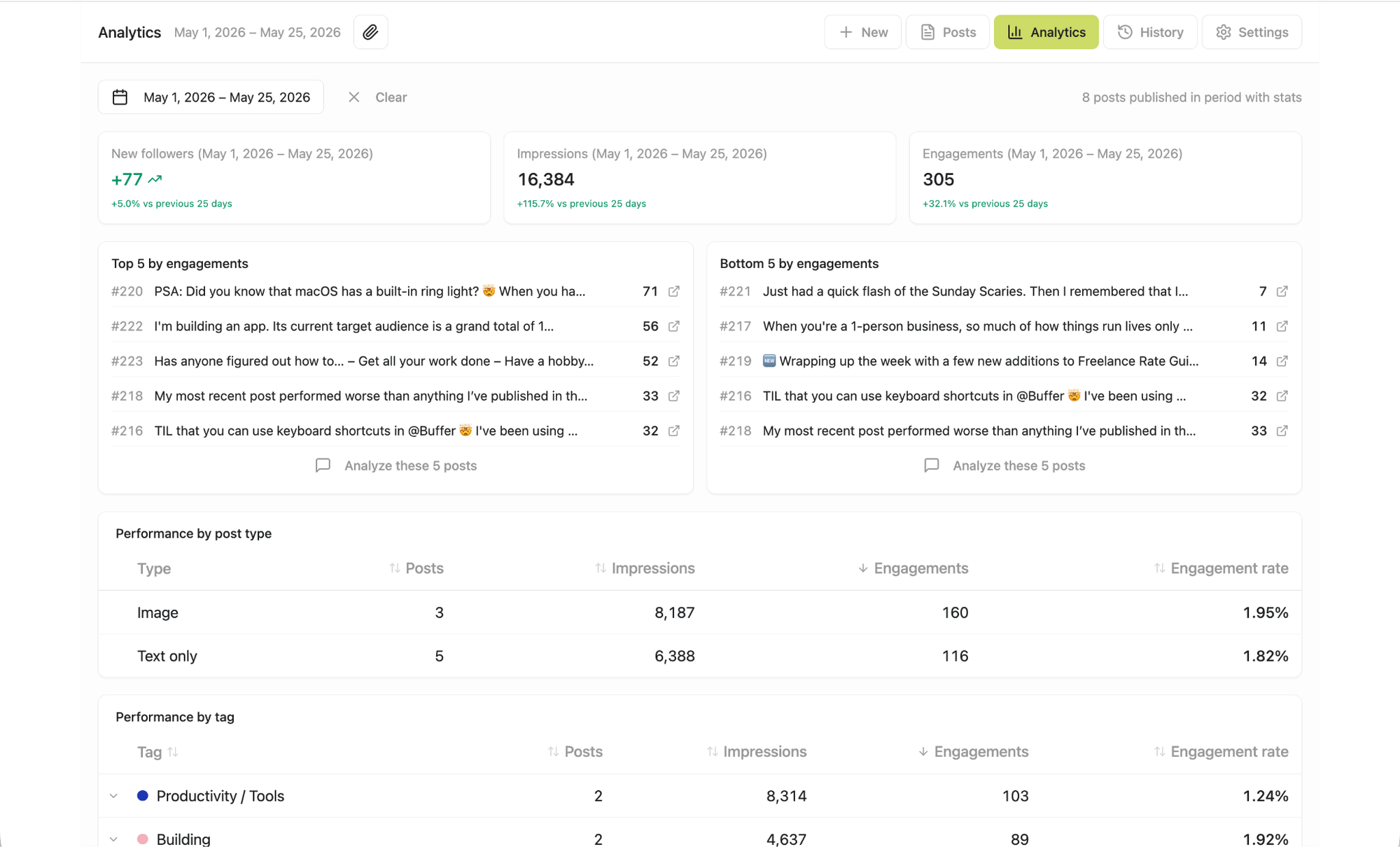
Since the Buffer API doesn’t offer analytics data sync yet, getting my stats into the app is still a manual workaround. I export post data from LinkedIn, and the app matches it to posts in the library.
Closing the loop with Buffer
The app doesn’t pull data in from Buffer and call it a day. When the AI suggests a content idea, I can tweak it and save it directly to Buffer’s Create space with one click.
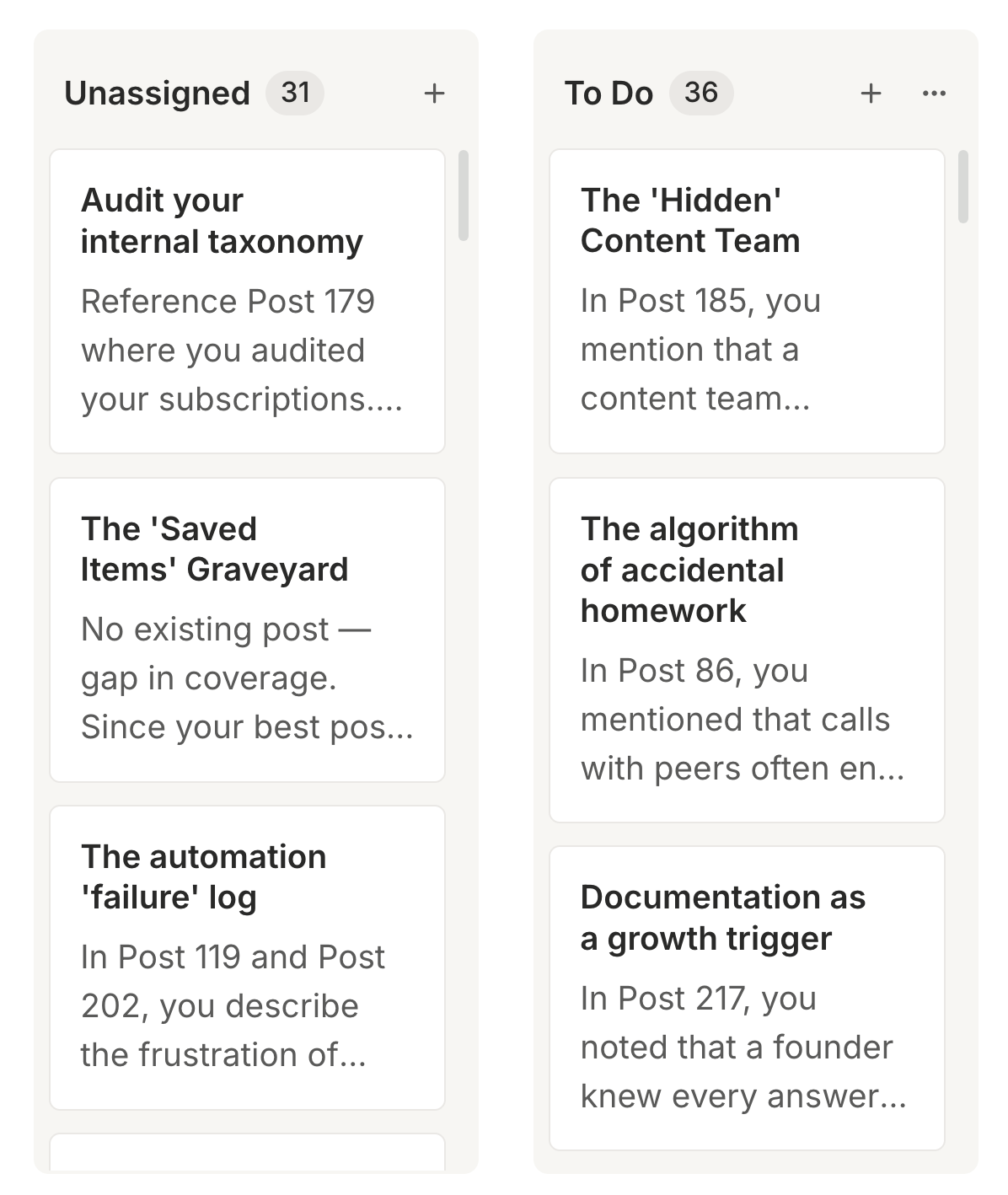
This is a newer feature, and I’ve already saved more than 30 ideas in Buffer to flesh out and turn into posts. Because the app has my post history and analytics, it gives me relevant, data-backed ideas to repurpose content without repeating myself.
The most powerful of these is the “buried seed” idea: the AI finds something mentioned in passing in an old post and gives me ideas for how to turn it into a standalone post.
Here’s an example of how that’s worked. I recently asked the app to analyze my posts about content creation — and then give me ideas for posts on freelancing and remote work.
It found a post published eight months ago on why I prefer to interview SMEs via Zoom instead of email, because “their eyes light up when they’re talking about something they’re passionate about.” The app’s buried seed idea? “Propose a post about why losing these non-verbal cues in async work is the biggest hidden cost of the remote operations model.”
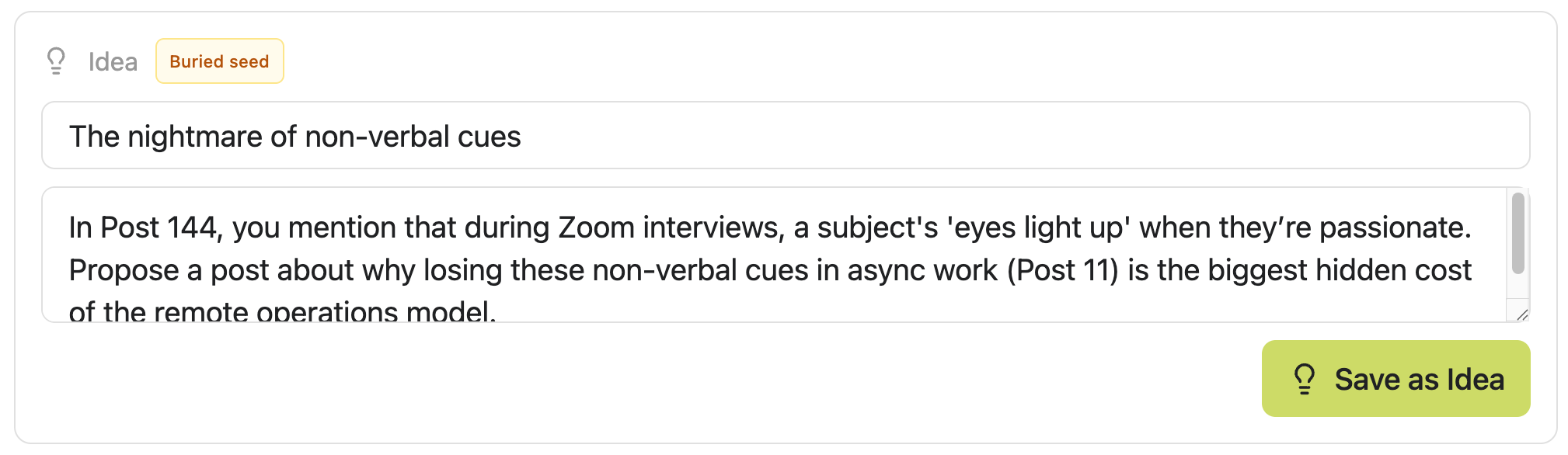
As someone who’s been working remotely since 2015 and swears by it, this is a fascinating idea for me to explore that I’m definitely going to post about soon.
It’s this two-way connection that makes the app a workflow tool instead of just an archive. Posts flow in from Buffer, get analyzed, form the seed for ideas, and those ideas flow back out to Buffer.
What changed
Being able to ask “What opinions have I shared about remote work?” and getting an answer backed by specific posts is something no other tool has given me. And it’s already shaping how I plan to show up on LinkedIn.
My content strategy so far has been to lean into what I’m working on at the moment for ideas. It wasn’t the easiest way to be consistent, because it felt like I was constantly starting from scratch. With the app, I can now post about what’s current in my work life and explore more about what the data tells me my audience has already responded to.
It’s also showing me gaps in how I approach topics or themes. I didn’t even realize that my remote work posts “generally focus on the psychological and operational friction of working outside a traditional office,” but it’s something I’ll keep in mind for sure when I’m planning new posts.
Now I just have to make time for content batching so I can turn those 30 ideas into posts and fill up my Buffer queue!
If you want to try something similar
Every post you’ve published contains ideas, positioning signals, and content seeds that can be analyzed and repurposed with the right tools at your disposal. The Buffer API makes it possible for you to build the ‘right’ tool for what you need and your technical capabilities.
The first version of my app, with a bare-bones post library and AI chat screen, took me only a day to build. What you’ve seen here took two months of iterating as I added new features on top of the MVP.
Lovable made building the app accessible without traditional coding skills. Once I connected the Buffer API and stored the API key, Lovable handled most of the heavy lifting behind the scenes. I didn’t need to know specific API endpoints or manually wire everything together.
That said, I still needed a clear idea of what I wanted the app to do and how I wanted it to work before I started building. And even with clear prompting, there was still troubleshooting, unexpected behavior, and plenty of iteration.
If you’d like to build your own app, platforms like Lovable or Replit make this entirely possible. Use the Buffer API to connect your data, describe what you want to build, and iterate from there.
For a lighter-weight version, you can skip the app entirely and still get some of the core benefits.
- Use the Buffer API to generate a spreadsheet from your posts. LLMs like Claude can easily do this for you.
- Upload your spreadsheet to a platform like Airtable to get a search and filter layer. Make sure the platform you choose can search post content, not just titles. For analysis, use the platform’s built-in AI.
- Connect the platform to Buffer via Zapier so new posts automatically get added and your post library stays updated.
- Set up Zaps to write back to your Create space.
To connect an LLM, log in to your Buffer account, head to Integrations, and follow the instructions.